Decoding the Cost of Custom Software Development
Understand the true cost of custom software development. This guide breaks down key cost drivers, pricing models, and real-world budget examples.
By Riya
11th Feb 2026
Last updated: 11th Feb 2026
Let's get right to it. Everyone wants to know the bottom line, but the truth is, the cost of custom software development is all over the map. You could be looking at anything from $30,000 for a straightforward internal tool to well over $500,000 for a sophisticated enterprise platform. It’s a lot like building a house—a simple one-story home and a multi-level custom estate are going to have very different price tags.
Your Guide to Estimating Custom Software Costs
This guide is designed to pull back the curtain on that pricing. The final number you see on a proposal isn't just pulled out of thin air. It’s a direct reflection of a series of deliberate choices you'll make about features, complexity, and the team you hire. Getting a handle on these drivers will empower you to have much more productive conversations with development partners and steer your project toward your actual business goals.
Setting a Realistic Budget Baseline
The first step is figuring out what's achievable at different price points. The good news? You don't always need a massive, six-figure budget to start making a real impact with technology.
For example, building a simple custom application—think a basic reporting dashboard or an inventory tracker for a small team—usually falls in the $30,000 to $100,000 range. These projects can often be completed in just 4-12 weeks, making them a fantastic starting point for small businesses or department managers aiming to fix a specific operational bottleneck. You can find more details on entry-level software costs at adevs.com.
That initial investment gets you the essentials. It takes a clunky manual process and makes it faster, more accurate, and less of a headache. It's a quick win that proves the value of custom tech without locking you into a huge, risky commitment.
To give you a clearer picture, here's a quick breakdown of what you can generally expect.
Quick Look: Custom Software Cost Estimates
| Project Complexity | Estimated Cost Range | Typical Timeline |
|---|---|---|
| Simple | $30,000 - $100,000 | 1-3 Months |
| Medium | $100,000 - $250,000 | 3-6 Months |
| Complex | $250,000+ | 6+ Months |
As you can see, the investment scales directly with the solution's scope and the timeline required to build it.
From Simple Tools to Complex Systems
As your business needs become more intricate, the software—and its budget—naturally follows suit. The key is to think of custom software not as one single thing, but as a wide spectrum of possibilities.
-
Simple Projects ($30k - $100k): These are all about solving one core problem exceptionally well. Think a data visualization tool or an app that automates a single, repetitive workflow. They typically have a clean, simple user interface and few, if any, integrations.
-
Medium Complexity ($100k - $250k): Now we're talking about software that does more. It might have different access levels for various user roles, connect with other systems you already use (like a Salesforce CRM or an ERP), and contain more advanced business logic under the hood.
-
Complex Enterprise Systems ($250k+): This is the big league. These are large-scale applications architected for high performance, iron-clad security, and the ability to grow with the business. They often manage sensitive information, require specialized developers, and plug into a whole ecosystem of third-party services.
The question isn't "Why is this so expensive?" but rather "What problem are we trying to solve, and what is the simplest, most effective way to solve it?" This shift in perspective turns a cost conversation into a value conversation.
Once you start breaking it down this way, it becomes clear that the cost of custom software development isn’t a mystery. It’s directly tied to the value and capability you need it to deliver.
The Seven Key Drivers of Your Software Budget
Trying to nail down the final cost of a custom software project is a lot like pricing a custom-built house. You can't just get a single price tag. The final number depends entirely on the choices you make—are you building a cozy two-bedroom bungalow or a sprawling six-bedroom estate with a pool?
Every decision, from the foundation to the fixtures, shapes the final budget. It's the same with software. The total investment isn't a mystery; it's the sum of a series of deliberate decisions. Once you understand the seven key factors that drive the cost, you gain control. You can make smart trade-offs and ensure every dollar you spend is pushing your business forward.
This diagram breaks down how major components like features, complexity, and team size all feed into the final price.
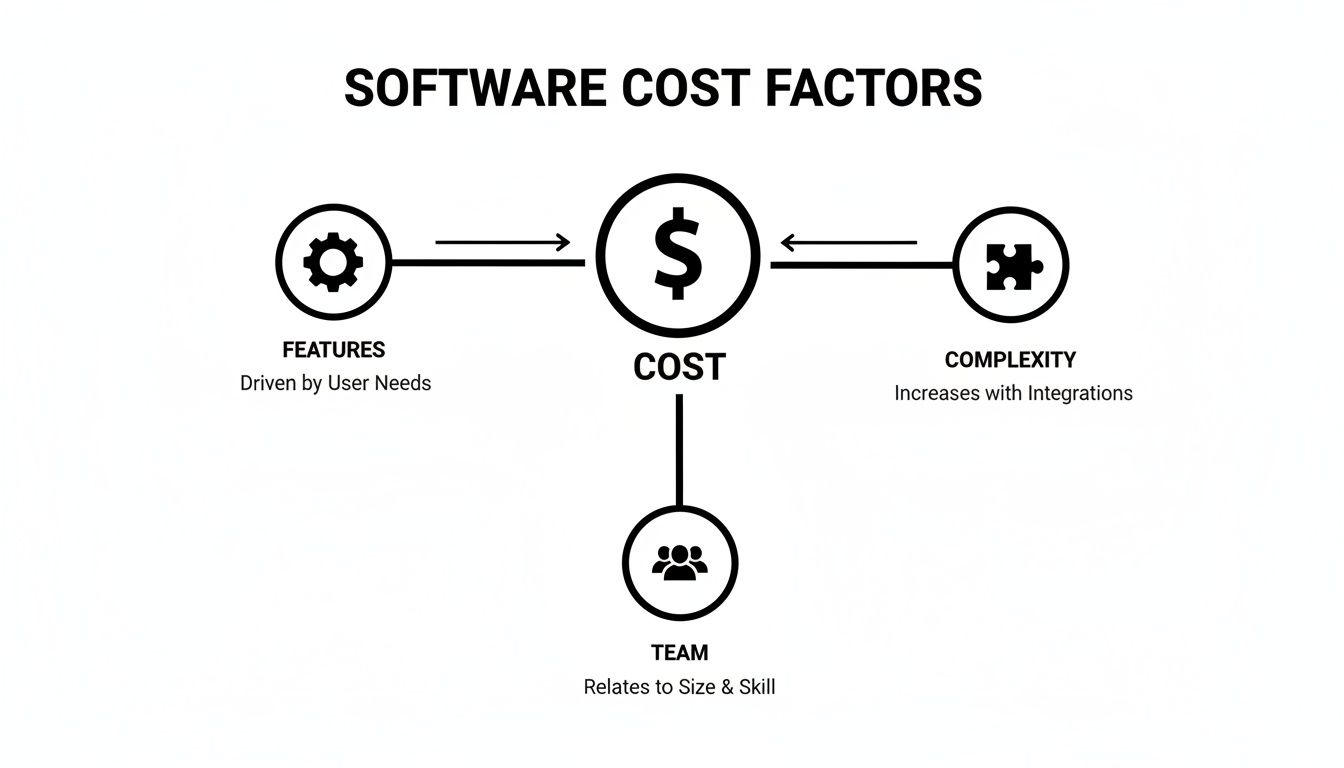
As you can see, these elements are all connected. A change in one area often sends ripples through the others, directly impacting your budget.
1. Project Scope and Features
The single biggest driver of your budget is the project's scope. In simple terms: what will the software actually do? A straightforward application with a handful of core functions is a world away from a complex platform juggling dozens of features, user roles, and screens.
Think of it like building that house. Every new feature is another room. Each one needs its own blueprints, materials, and labor. The more "rooms" you add, the more time and resources it takes, and the cost climbs accordingly.
2. Software Complexity
Beyond just the number of features is how complex they are. A simple "contact us" form is one thing, but a multi-step user onboarding flow with real-time data validation, conditional logic, and personalized content is another beast entirely.
Complexity often comes from:
- Intricate Business Logic: Custom rules and workflows that mirror your company's unique way of doing things.
- Third-Party Integrations: Making your new software talk to existing tools like a CRM, an ERP, or a payment gateway.
- Compliance and Security: Needing to follow strict industry standards like HIPAA or GDPR, which demands specialized knowledge, development, and rigorous testing.
3. UI and UX Design
How the software looks and feels is absolutely critical for getting people to actually use it. A polished, intuitive user interface (UI) and a smooth user experience (UX) don't happen by magic—they are the result of dedicated research, design, and testing.
This work involves creating wireframes, mockups, and interactive prototypes to make sure the final product isn't just nice to look at, but is also genuinely easy to use. It can be tempting to skimp on design to save a few bucks, but a bad user experience can kill even the most powerful software. It's an investment, not an expense.
A well-designed user experience isn't a luxury. It's a core component that drives engagement and cuts down on future costs for training and support. Investing in thoughtful design early on saves you from expensive rework later.
4. The Technology Stack
The programming languages, frameworks, and databases used to build your application are known as the technology stack. Think of this as the engine and chassis of your car. A standard, reliable engine gets the job done cost-effectively, while a high-performance, specialized engine costs more but delivers incredible power.
Your choice of tech stack can easily account for 15-20% of the total project budget. For instance, building a web app with a common stack like LAMP (Linux, Apache, MySQL, PHP) is generally more affordable because there’s a huge pool of developers available, with rates often around $80-$120/hour. On the other hand, if your project requires niche skills in something like blockchain or advanced AI, developer rates can skyrocket to $200-$300/hour. This is pure supply and demand, as only about 5% of developers have these high-end skills. You can discover more insights about development costs on Forbes.com.
5. Development Team Composition and Location
Who builds your software and where they are in the world are massive cost variables. A proper development team is more than just a few coders. It's a coordinated unit with specific roles:
- Project Manager: Keeps the project on track, on budget, and ensures everyone is on the same page.
- Business Analyst: The bridge between your business goals and the technical team, translating needs into clear requirements.
- UI/UX Designer: Designs the look, feel, and flow of the application.
- Software Developers (Frontend/Backend): The engineers who write the actual code.
- QA Engineer: The quality gatekeeper who tests everything to find and squash bugs before users do.
The geographic location of your team also has a huge impact on the bottom line. Developers in North America and Western Europe command much higher hourly rates than equally skilled talent in Eastern Europe, Asia, or Latin America.
6. Third-Party Integrations
In today's connected world, software rarely works in isolation. It almost always needs to talk to other systems—payment processors like Stripe, communication tools like Twilio, or cloud infrastructure like AWS.
Each of these integrations adds another layer of complexity and, therefore, cost. Developers have to work with another company's API (Application Programming Interface), which can range from beautifully documented and simple to outdated and downright painful. This all takes time and expertise.
7. Post-Launch Support and Maintenance
The journey doesn't end when your software goes live. Far from it. Just like a new car needs oil changes and tune-ups, your software needs ongoing maintenance to stay secure, fast, and functional. A good rule of thumb is to budget 15-20% of the initial development cost annually for this.
This ongoing investment covers essentials like server hosting, bug fixes, applying security patches, and updating the code to work with new browsers or operating systems. Factoring this in from day one is the only way to protect your investment and ensure it delivers value for years to come.
Choosing the Right Pricing Model for Your Project
Figuring out how you'll pay for your custom software is just as critical as deciding what you're building. The right pricing model can make or break your project, aligning your budget with the realities of development. Picking the wrong one? That’s a fast track to budget blowouts, friction with your development partner, and a final product that just doesn't hit the mark.
Think about it like this: you wouldn't pay for a custom mural—where the design is locked in upfront—the same way you'd fund an open-ended scientific experiment. Each situation demands a different approach to managing financial risk and scope. Let's dig into the three main models you'll come across in software development.
The Fixed Price Model
The Fixed Price model is as straightforward as it gets. You and your development partner agree on a detailed scope of work for one single, locked-in price. It’s like commissioning a custom piece of furniture; you know exactly what you’re getting and precisely what it will cost before anyone starts building.
This model shines for smaller projects with a rock-solid, well-documented scope. If you can map out every feature, screen, and user flow with absolute clarity from the get-go, a fixed price offers fantastic budget predictability.
But that rigidity is a double-edged sword. While it provides cost certainty, it leaves almost zero room for change. If you have a brilliant new idea mid-project or need to pivot based on user feedback, you’ll have to initiate a formal—and often expensive—change request.
The Time and Materials Model
On the other end of the spectrum is the Time & Materials (T&M) model, which is all about flexibility. Instead of one flat fee, you pay an agreed-upon hourly or daily rate for the time your team actively spends on the project, plus the cost of any necessary tools or licenses.
This approach is tailor-made for complex, long-term projects where the requirements are bound to evolve. It champions an agile, iterative process, letting you adjust priorities, add features, and respond to the market as you go. You get total transparency, seeing exactly where every dollar of your budget is being spent.
The trade-off, of course, is that you don't have a guaranteed final price tag. The total cost of custom software development is variable, which means you need a high level of trust and constant communication with your development partner, plus sharp project management to keep things on track.
The Time & Materials model treats software development not as a one-time purchase, but as an ongoing collaboration. It prioritizes building the right product over sticking to an initial, and possibly flawed, plan.
The Dedicated Team Model
The Dedicated Team model strikes a balance between predictability and flexibility, making it a great option for large-scale, ongoing initiatives. With this setup, you're essentially hiring a full remote team—developers, designers, project managers—who work exclusively for you.
You pay a consistent monthly fee that covers your team's salaries and overhead. This gives you predictable monthly costs, much like having your own in-house staff but without the headaches of recruitment and HR. You get a stable, focused team that becomes deeply invested in your business and product over time.
This model gives you the freedom to direct the team's focus week to week, making it a perfect fit for businesses that need continuous development, new features, and ongoing maintenance. It's less of a project-based transaction and more of an investment in a long-term partnership.
Comparing Software Development Pricing Models
Choosing the right model is all about matching the financial structure to your project's DNA. This table offers an at-a-glance comparison to help you see which approach aligns best with your goals, tolerance for risk, and need for flexibility.
| Model | Best For | Pros | Cons |
|---|---|---|---|
| Fixed Price | Small, well-defined projects (e.g., MVP, simple internal tool). | Budget predictability; clear deliverables and timeline. | Inflexible; risk of quality issues if rushed; costly changes. |
| Time & Materials | Complex projects with evolving requirements. | High flexibility; agile development; high-quality end product. | Lack of budget certainty; requires strong project oversight. |
| Dedicated Team | Long-term, large-scale projects needing continuous work. | Predictable monthly cost; high team engagement and expertise. | Higher overall investment; less ideal for short-term projects. |
Ultimately, the best model depends on your specific context. A simple, well-understood project might thrive on a fixed price, while an ambitious, innovative product will almost certainly need the adaptability of a T&M or Dedicated Team approach.
Real-World Cost Examples by Project Type
Let's move past the abstract numbers and talk about what these costs actually look like on the ground. Seeing some real-world examples is the best way to get a feel for how scope, team size, and timelines all come together to determine the final price tag.
Think of these scenarios as rough blueprints. They can help you frame your own project and have a more confident conversation with stakeholders about the potential investment.

Simple Project: A Custom Internal Tool
Imagine an e-commerce company’s operations manager is tearing their hair out over a clunky spreadsheet system for tracking warehouse inventory. It’s a mess—slow, error-prone, and completely disconnected from what’s happening in real-time. They just need a simple, focused tool to solve this one painful problem.
This kind of project is a perfect candidate for a quick, streamlined build. The goal is crystal clear: create a web app where warehouse staff can scan and update stock levels, and managers can pull up a live inventory dashboard. No fluff, just function.
- Key Features: User login, a simple form to add or update inventory, a searchable product list, and a basic dashboard for at-a-glance reporting.
- Team Composition: You can keep the team lean and agile. Typically, this involves a project manager, one full-stack developer, and a QA engineer.
- Timeline & Cost: With a tight, well-defined scope, you can knock this out in 2-4 months. The budget will almost always fall in the $40,000 to $85,000 range, with most of that cost going directly to developer hours and project oversight.
Medium Project: A Customer-Facing Web App
Now, let's level up. A B2B service company wants to build a secure portal for its clients. The idea is to create a self-service hub where customers can manage their accounts, track project progress, download invoices, and message their account manager. This is a big step up from a simple internal tool because it’s now a user-facing product that needs to be polished and reliable.
Building an application with this level of complexity usually costs between $75,000 and $250,000. The timeline also stretches out to 4 to 9 months. These projects have more moving parts: tougher backend logic, different user roles (like admins vs. clients), and critical integrations with other business systems, such as a CRM. Interestingly, research shows that 60% of businesses building these apps set aside an extra 15-25% of the budget for unexpected scope changes. If you want to dig deeper into app budgeting, you can read the full research about app development costs.
- Key Features: Secure login and authentication, role-based permissions, a project dashboard, document storage, an invoicing and payment history section, and integration with a payment processor like Stripe.
- Team Composition: The team naturally gets bigger. You'll need a dedicated UI/UX designer to make sure the experience is intuitive, plus separate backend and frontend developers.
- Timeline & Cost: More extensive design, development, and testing phases are non-negotiable here. That pushes the timeline to 5-8 months, with a final budget likely landing between $90,000 and $220,000.
A project's complexity isn't just about the number of features. It's about how those features interact with each other, with external systems, and with the end-user. Each connection point adds to the development effort and, consequently, the cost.
Complex Project: An Enterprise SaaS Platform
For our final example, think big. A logistics company wants to build a massive enterprise platform from the ground up. This Software-as-a-Service (SaaS) product needs to manage their entire supply chain—from fleet management and route optimization to real-time shipment tracking and predictive analytics for delivery times.
This isn't just an app; it's a high-stakes, multi-layered system built for massive scale, ironclad security, and peak performance. It has to juggle huge amounts of data and reliably serve thousands of users at the same time.
- Key Features: A multi-tenant architecture (to serve many customers), complex route optimization algorithms, real-time GPS tracking, a predictive analytics engine, a "super-admin" panel for management, and APIs to connect with third-party systems.
- Team Composition: This calls for the A-team. You’ll need a product manager, a solution architect, multiple senior developers (backend, frontend, maybe mobile), a DevOps engineer to manage the infrastructure, and a dedicated QA team.
- Timeline & Cost: Building an enterprise-grade platform is a marathon, not a sprint. The first version alone could take 12-18+ months. The cost of custom software development for a project of this magnitude almost always starts at $300,000 and can easily sail past $750,000, all depending on how deep the feature set goes and the specialized talent required.
How to Reduce Costs Without Sacrificing Quality
Everyone wants to control the budget for custom software, but nobody wants to end up with a shoddy, second-rate product. The good news is, you don't have to choose. Smart cost reduction isn't about cutting corners; it's about making strategic choices and focusing your investment where it will make the biggest impact.
It’s all about shifting your mindset. Instead of trying to build the entire grand vision at once, you concentrate on building the right thing first. By ruthlessly prioritizing and testing your core ideas early, you dramatically lower your financial risk and get a working product to your users much, much faster.

Start with a Minimum Viable Product
The single most powerful strategy for keeping costs in check is to launch with a Minimum Viable Product (MVP). An MVP isn't a cheap or broken version of your app. It's the simplest, most focused version that solves one critical problem for your target audience, and does it well.
Think of it like this: you want to build a car, but instead, you start by building a skateboard. The skateboard proves the core concept—personal transportation—and validates that people actually want to get from point A to point B. Only then do you invest in an engine, chassis, and all the bells and whistles.
This isn't just theory. A detailed study from the Project Management Institute revealed that projects that kick off with a well-defined MVP are completed, on average, 35% faster and come in 50% under budget. You can dig deeper into the MVP findings from PMI's research to see the data for yourself.
An MVP forces you to answer the most important question: "What is the one essential function this software must perform to be valuable?" By zeroing in on this, you sidestep the trap of spending a fortune on features that sound great in a brainstorm but that no one ever actually uses.
Prioritize Features and Avoid Over-Engineering
With your MVP defined, the next step is to treat every new feature idea with extreme discipline. Not all features are created equal. Some are non-negotiable for the user experience, while others are just "nice-to-haves" that can easily wait for a later version.
A simple framework can help you make these tough calls:
- Must-Have: Features that are absolutely essential. The software is broken or useless without them.
- Should-Have: Important features that add major value but aren't deal-breakers for the first launch.
- Could-Have: Desirable extras you can add down the line if you have the time and budget.
- Won't-Have: Ideas you explicitly agree to leave out of the current phase.
This approach is your best defense against "scope creep"—the slow, silent addition of features that blows up your timeline and budget. It also protects you from over-engineering, which is the temptation to use a complex, expensive tech stack when a simpler, more affordable one would get the job done just as well.
Accelerate Development with Modern Platforms
Here's the thing: for many internal tools, dashboards, and operational apps, writing every line of code from scratch is no longer the smartest option. New AI-powered platforms are completely changing the game by slashing the time and money needed to build incredible software.
Take a platform like FlyDash, for instance. It lets you build the exact tools you need in minutes, not months. You simply describe what you want the application to do, and its AI generates a complete, working product—user interface, backend, database and all. This puts the power directly in the hands of your operations or finance teams, letting them solve their own problems without getting stuck in a long, expensive engineering queue.
The benefits here are huge:
- Drastically Lower Costs: Automating a huge chunk of the coding process can cut your development expenses by up to 90% compared to traditional routes.
- Incredible Speed: You can move from an idea to a functioning internal application in a tiny fraction of the time, boosting your team's efficiency almost instantly.
- Full Customization and Control: This isn't a rigid, off-the-shelf tool. Platforms like FlyDash give you full access to the code. You can start with AI generation and have your own developers customize or extend it later. You never hit a wall or get locked into a vendor's ecosystem.
By combining a smart MVP strategy with powerful new tools, you can slash the cost of custom software development while still shipping high-quality solutions that deliver real, measurable results for your business.
Answering Your Top Software Cost Questions
Even after you've dug into the key drivers and seen some real-world examples, a few big questions almost always linger. Getting a handle on the nuances of software estimates and long-term ownership is what separates a smart investment from a money pit. Let's tackle the most common concerns that pop up once the initial proposals are on the table.
Think of this as the final layer of clarity you need to navigate the entire lifecycle of your software investment with confidence.
How Accurate Are Initial Cost Estimates?
An initial software estimate is best seen as an informed forecast, not a fixed price tag. It's a lot like getting a quote for a home renovation. A contractor can give you a solid ballpark figure based on your initial plans, but the final cost only becomes crystal clear once they start opening up walls and discovering what’s really behind them.
Software development works the same way. The accuracy of any quote is tied directly to how much detail you can provide upfront.
- Early Stage (Low Accuracy): If you're working off a one-page idea summary, the estimate might be off by 50% or more. This is really just a rough order of magnitude to see if the project is even in the realm of financial possibility.
- Mid-Stage (Medium Accuracy): After you've gone through detailed requirement gathering, wireframing, and some technical discovery, the estimate gets much sharper. At this point, you're typically looking at a 15-25% margin from the final cost.
- Late Stage (High Accuracy): Once a full project scope is documented and a prototype is approved, the estimate becomes highly reliable, often within 5-10%.
The bottom line is that an estimate isn't a guess; it's a reflection of known information. As you and your development partner flesh out the project's specifics, the financial picture naturally comes into sharper focus.
What Are the Hidden Costs of Custom Software?
The initial development bill is just the beginning of your software's financial story. The true cost of custom software development is its Total Cost of Ownership (TCO), which includes every expense needed to keep it running, secure, and valuable over its entire lifespan. Forgetting to budget for these ongoing costs is one of the most common and painful mistakes a business can make.
The launch of your software isn't the finish line; it's the starting line for its operational life. A sustainable budget plans for the entire race, not just the first lap.
As a rule of thumb, ongoing maintenance and support typically cost 15-20% of the initial development budget every single year. A huge chunk of this is post-launch expenses. In fact, research shows that over 75% of the TCO for enterprise software is spent after the initial launch, making this a critical part of your financial planning. You can learn more about Gartner's findings on software ownership costs.
Here are the key post-launch costs to anticipate:
- Server Hosting & Infrastructure: The monthly or annual fees for cloud services like AWS or Azure that power your application.
- Third-Party Licenses: Ongoing costs for any APIs, plugins, or services your software depends on to function.
- Monitoring & Bug Fixes: Proactive monitoring to catch issues before they become problems, plus the developer time needed to fix the bugs that inevitably emerge.
- Security Patches & Updates: The crucial work of keeping your application and all its dependencies up-to-date to protect against new threats.
When Should I Choose Custom vs Off-the-Shelf?
This is the ultimate strategic question. The decision between building a custom solution and buying a pre-made tool really boils down to one thing: competitive advantage. Off-the-shelf software is designed to solve a common problem for a broad audience. Custom software is built to solve your specific problem in a way that sets your business apart.
Consider an off-the-shelf tool when:
- Your business processes are standard and can easily bend to the software's existing workflow.
- The features you need are generic (think basic CRM, project management, or accounting).
- Getting a solution up and running quickly for a lower upfront cost are your top priorities.
However, you should invest in a custom solution when:
- You have a unique business model or workflow that no existing software can properly support.
- The software itself is the core of your product or service offering—it is the business.
- You need to integrate deeply with other proprietary systems already running in your company.
- The whole point is to create a specific, branded experience for your customers or employees that provides a clear competitive edge.
Choosing custom software is an investment in your company's unique operational DNA. It’s about building a tool that works exactly the way you do, giving your team a powerful advantage that no competitor can simply buy off a shelf.
Ready to build the exact tools your business needs without the massive cost and timeline of traditional development? With FlyDash, you can generate complete, production-ready internal applications in minutes, not months. Describe your ideal tool, and let our AI build the frontend, backend, and database for you, slashing development costs and empowering your team to solve problems at speed. Build your first app with FlyDash today.
Ready to Build Your App?
Turn your idea into a production-ready React Native app in minutes.
Free tools to get you started
Free AI PRD Generator
Generate a professional product requirements document in seconds. Describe your product idea and get a complete, structured PRD instantly.
Try it freeFree AI App Name Generator
Generate unique, brandable app name ideas with AI. Get creative name suggestions with taglines, brand colors, and monogram previews.
Try it freeFree AI App Icon Generator
Generate beautiful, professional app icons with AI. Describe your app and get multiple icon variations in different styles, ready for App Store and Google Play.
Try it freeFrequently Asked Questions
RapidNative is an AI-powered mobile app builder. Describe the app you want in plain English and RapidNative generates real, production-ready React Native screens you can preview, edit, and publish to the App Store or Google Play.