How to Improve Operational Efficiency: 7 Practical Strategies to Boost Workflow
Learn how to improve operational efficiency with practical strategies, automation, and real-world examples to streamline workflows and boost productivity.
By Riya
13th Feb 2026
Last updated: 13th Feb 2026
Improving operational efficiency isn't about some grand, abstract theory. It's a hands-on process of finding the real bottlenecks in your daily work, redesigning those workflows for how we operate today, bringing in smart automation, and constantly keeping an eye on performance.
This isn't just about shaving a few dollars off the budget. It's about building a business that's resilient, scalable, and ready for whatever comes next.
Why Operational Efficiency Is Your New Competitive Edge
Let's be real—"operational efficiency" can sound like a buzzword from a stuffy corporate meeting. But what it actually means is getting rid of waste. Wasted time, wasted money, and most importantly, wasted human potential.
It’s about asking the tough questions. Why does it take the finance team 40 hours every month to manually pull together reports? Why does onboarding a new client involve logging into seven different apps and copying the same information over and over? Solving these problems isn't just a "nice to have." It's a direct line to real, sustainable growth.
The modern business world doesn't have patience for slow, clunky operations. In fact, figuring out how to work smarter has become a top priority for leaders everywhere.
The Global Push for Smarter Operations
This isn't just a gut feeling; the data backs it up. A recent survey found that a massive 79% of global business leaders are actively working to make their operations faster and more resilient.
Even more telling? Companies with high profit growth are 2.6 times more likely to say their operating models are already in great shape compared to their competitors. If you want to dive deeper into the numbers, the 2025 HLB International Survey of Business Leaders has some fascinating insights.
"Too much time is spent on rote tasks. Workflow takes out the human component of trying to remember what to do when a certain something happens."
This gets to the heart of it. Efficiency isn't about making people work harder; it's about giving them better processes so they can focus on what really matters.
To give you a clear roadmap for the rest of this guide, here's a quick look at the core pillars we're going to break down.
The Core Pillars of Operational Efficiency
| Pillar | Objective | Key Action |
|---|---|---|
| Diagnose Inefficiencies | Pinpoint the exact sources of wasted time, effort, and resources. | Conduct a process audit and gather direct feedback from your team. |
| Define Success Metrics | Establish clear, measurable goals to track progress and define what "better" looks like. | Set specific KPIs for key processes, like "reduce report generation time by 50%." |
| Redesign and Automate | Reimagine workflows to eliminate unnecessary steps and automate repetitive tasks. | Map out new processes and use tools to handle manual data entry or approvals. |
| Build and Implement | Create the internal dashboards and tools needed to support the new, efficient workflows. | Develop simple, user-friendly tools that bring data and actions into one place. |
| Measure and Iterate | Continuously track performance against your metrics and make ongoing adjustments. | Review dashboards, gather new feedback, and refine your processes over time. |
This table outlines the systematic approach we'll follow. It’s a repeatable cycle that, once you get it going, becomes a powerful engine for continuous improvement.
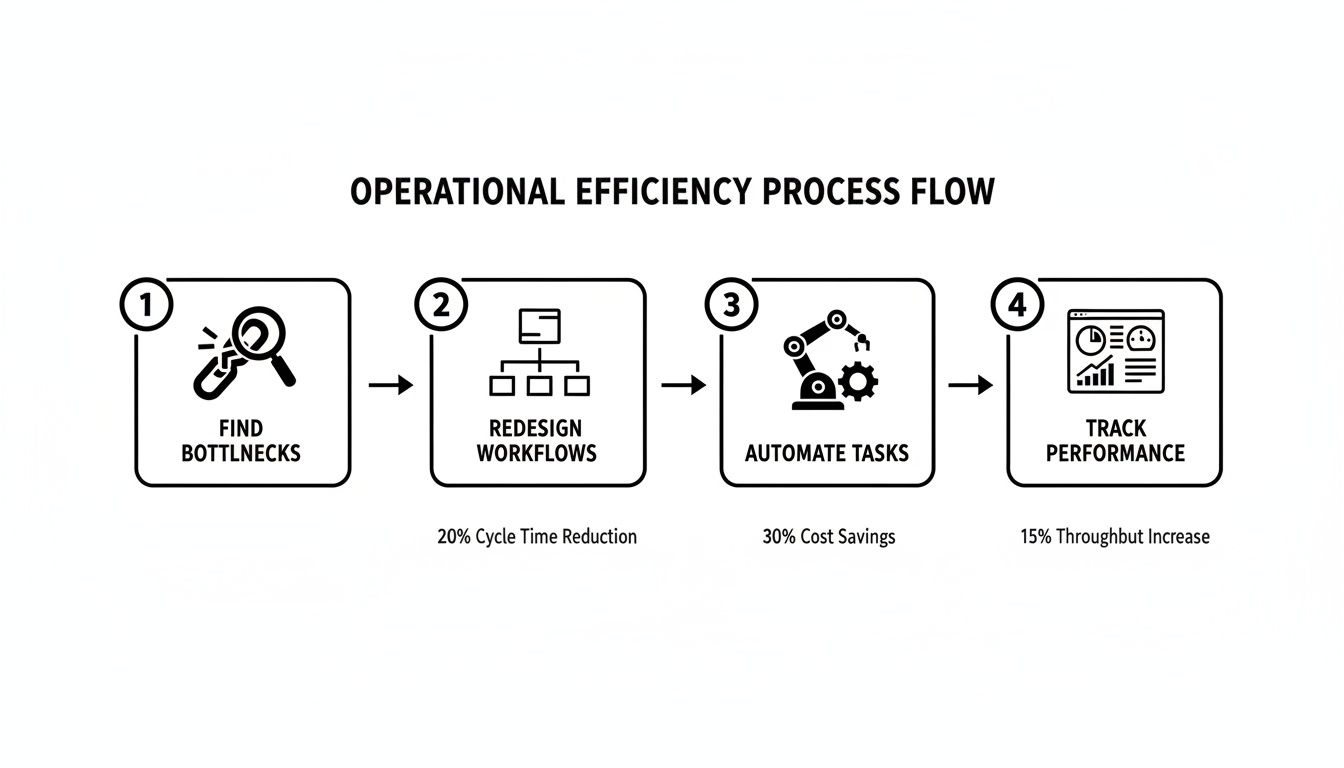
This simple loop—find the problem, fix it, automate it, and track it—is the foundation. When this becomes part of your company's DNA, you don't just become more efficient; you build a lasting competitive advantage.
Figuring Out Where Things Are Actually Breaking Down
You can't fix a problem you don't fully understand. Before you jump into solutions, you have to get an honest, unfiltered look at where the real friction points are. This isn't about guesswork; it's about digging into the day-to-day reality of how work gets done.
A fantastic place to start is with process mapping. Forget creating a perfect, polished diagram. The real value comes from sitting down with the people who actually do the work—say, your finance team during a chaotic month-end close—and literally drawing out every step. Every click, every manual data entry, every time they have to switch between two different spreadsheets. You’ll be shocked at the redundancies and frustrating little hurdles you never even knew existed.
Another surprisingly powerful tool is the "Five Whys." It’s a simple but brilliant method for digging past the surface-level symptoms to find the actual root cause of a problem.
Getting to the Real "Why"
Let's say your customer onboarding is painfully slow. Instead of just shrugging and accepting it, you start asking questions.
- Why is onboarding so slow? "Well, it takes forever to get the new client's information into our main system."
- Why does that take so long? "Because we have to manually copy and paste everything from the original sales form."
- Why are we copying and pasting it? "Because the sales form and our CRM don't sync up."
- Why don't they sync? "We never set up an integration between them."
- Why didn't we set that up? "Honestly, we assumed it would be too expensive and complicated to do."
Just like that, you've gone from a vague complaint about "slow onboarding" to a specific, solvable problem: a missing integration. This technique peels back the layers and gives you something concrete to work on.
When you pinpoint the true bottleneck, you can stop applying band-aids and start building a real, lasting solution. This focus is everything when you're trying to figure out how to improve operational efficiency in a way that actually matters.
Finally, never underestimate the power of just talking to your people. Stakeholder interviews are an absolute goldmine of operational knowledge. Your team on the front lines knows exactly which tasks are a soul-crushing time-suck and which software creates more headaches than it solves.
Pull people aside for brief, informal chats. You'll learn more in 15 minutes than you will from a week of staring at reports. Try asking questions like:
- "What's the most repetitive, mind-numbing task you have to do every day?"
- "If you could wave a magic wand and get rid of one administrative task forever, what would it be?"
- "Which two software tools fight you the most?"
Their answers give you a human-centric map of your company's biggest inefficiencies. Combine this on-the-ground feedback with your process maps and the "Five Whys," and you'll have a crystal-clear, prioritized list of the bottlenecks that are causing the most pain—and holding you back the most.
Redesigning Workflows for a Digital-First World
Now that you've pinpointed the biggest operational headaches, it’s time to rethink how work actually gets done. This isn't about making small tweaks to a process that’s already broken. It’s about starting with a clean slate and designing your workflows for a world where digital tools are the default, not an afterthought.
The real goal here is to move from clunky, manual systems to smooth, efficient operations. That means questioning old habits and asking, "If we were building this from scratch today, what would it look like?" The answer nearly always involves cutting out useless steps and thinking about automation from day one.
Bring Your Team Into the Redesign Process
The single most important part of a successful workflow redesign? Involving the people who will actually be using it. Your team members are the true experts on their daily tasks. They know the sticking points, the workarounds, and the things that drive them absolutely nuts. Pushing a new process on them from the top down is a surefire way to fail.
Instead, make the redesign a team sport. Run a few quick brainstorming sessions focused on a specific bottleneck, like how you onboard new clients or manage inventory.
- Map out the "perfect" process: Ask them what a friction-free version of their workflow would look like in an ideal world.
- Find the tech gaps: Have them point out exactly where a simple tool or a new integration could get rid of tedious manual work.
- Let them build: Give them access to modern tools so they can start building out their own solutions.
This collaborative approach doesn't just produce a better result; it creates a sense of ownership. When the team helps build the solution, adopting the new system feels like a natural evolution, not a command from on high.
Prototype New Solutions with Modern Tools
Not too long ago, fixing a workflow with a custom tool meant a long, expensive development project. That’s just not true anymore. No-code and AI-powered platforms have completely changed the game, giving operations managers the power to build and test solutions in hours, not months.
The real magic of these tools is speed. Instead of spending six months planning a new CRM, you can use a platform like FlyDash to whip up a working prototype in an afternoon. You get immediate feedback from your team and can make changes on the spot.
Let's say your sales team is buried in spreadsheets. Instead of buying another off-the-shelf CRM that’s a "close enough" fit, you could try this:
- Just describe what you need: "Build me a simple dashboard to track new leads coming from our website form."
- Generate a working prototype: The AI builds a functional app, complete with a database connection.
- Test and tweak: The sales team uses the new tool for a week, gives you their feedback, and you refine it in real-time.
This approach turns process improvement from a massive, one-off project into an ongoing cycle of small, smart innovations. By adopting this agile mindset, you can constantly fine-tune how your business runs, making sure your workflows are always helping your team do their best work, not getting in their way.
Get Technology to Do the Heavy Lifting: Automate and Integrate
Once you’ve re-engineered your core workflows, the real breakthrough in efficiency comes from putting your technology to work. This is all about smart automation—eliminating those repetitive, manual tasks—and integrating your software so everyone is working from a single source of truth. The mission is to rescue your team from the mind-numbing grind of data entry and report-building.
And this isn't just for massive companies with huge dev teams anymore. Modern, AI-powered platforms have made it surprisingly simple for anyone to automate even pretty complex processes. Just think about the regular headaches in your own business, whether it's compiling that weekly sales report or the multi-step drudgery of onboarding a new employee. Each one is a perfect candidate for automation.
Break Free From the Chaos of Disconnected Tools
One of the biggest, and often invisible, drains on a company's resources is the time people spend wrestling data out of a dozen different apps. If your team is constantly bouncing between your CRM, project management tool, accounting software, and a handful of spreadsheets just to get a straight answer, you’ve got an integration problem.
This isn't just a small annoyance; it's a massive operational drag. The latest workplace data paints a pretty grim picture here. Eptura's 2025 Workplace Index found that 50% of businesses are trying to manage 17 or more separate work tools, and only a tiny 4% have their systems fully integrated. It gets worse: 37% of companies have 11 or more full-time employees whose main job is just pulling data together from all these different places. You can dig into more of these productivity-killing workplace statistics to see just how big this problem has become.
The real cost of disconnected systems isn't the software subscriptions. It's the salaries you're paying talented people to do the boring, repetitive work that a simple integration could do in seconds.
This is exactly why having a central hub is no longer a "nice-to-have." An AI-powered tool can plug directly into your databases and software APIs, becoming the connective tissue for all your siloed systems. Instead of your people manually copying and pasting information, the platform handles it all, ensuring your data is always consistent and accurate.
Real-World Automation Wins You Can Implement Now
Okay, let's get practical. Improving operational efficiency with automation is all about targeting specific, high-impact tasks that are currently eating up your team's time.
Here are a few common scenarios where automation can make an immediate difference:
- Automated Financial Reporting: Imagine your finance manager spends two full days every month pulling data from Stripe, QuickBooks, and your CRM into a massive spreadsheet. An automated workflow can do that job instantly. It grabs the latest figures, builds the report in the right format, and can even email it to the leadership team on the first of the month, every month.
- Seamless HR Onboarding: The moment a new hire signs their offer letter, an automation can kick off. It can instantly create their accounts in all the necessary systems (like Slack, Google Workspace, and your project tool), assign them their first training modules, and schedule their introductory meetings. Every new hire gets a consistent, professional start.
- Instant Sales Lead Management: You can connect your website's contact form directly to your sales pipeline. When a new lead comes in, an AI tool can create a new record in your CRM, assign it to the right sales rep based on territory rules, and fire off a personalized welcome email—all before a human even sees the notification.
These examples aren't about replacing your team. They're about empowering them. By integrating your tools and automating these essential but monotonous workflows, you free up your people to focus on the strategic, creative work that actually drives the business forward.
Build Internal Tools That Actually Solve Problems
Once you've automated the low-hanging fruit, the next big leap in operational efficiency comes from building the exact tools your team needs to do their jobs. For years, this was a tough spot to be in. The classic "buy vs. build" debate usually meant choosing between expensive, clunky software that didn't quite fit, or sinking a ton of time and money into a massive internal development project.
Thankfully, there's a third option now, and it completely changes the game.
AI-assisted tool generation is making it possible for anyone—not just engineers—to create custom internal apps. This puts the power directly into the hands of the operations and finance leads, the people who know the business problems inside and out. It’s a straight shot from identifying a pain point to having a working application, without needing to write a single line of code.
From a Simple Idea to a Full-Fledged App
The process is almost unbelievably simple. Instead of writing up a massive, jargon-filled technical spec document, you just describe the tool you need in plain English.
Think about a classic operational headache: tracking sales performance. An ops manager might start with a simple prompt, something like:
“Build a dashboard to track our top sales KPIs from Stripe. I need to see monthly recurring revenue, new subscriptions, and churn rate. It should also let me filter everything by date.”
That one sentence is enough to kick off the creation of a complete, full-stack application. In just a few minutes, you can have a working tool with a clean frontend for your team to use, a secure backend, and a live connection to your data. This means you can get a solution into your team's hands almost instantly.
Here's a look at what this can look like in practice. This screenshot from FlyDash shows an AI-generated dashboard that pulls in real-time data from a few different places and presents it in a clean, intuitive way.
You can see how complicated data, like sales funnels and user activity, gets turned into simple, actionable insights that anyone on the team can grasp at a glance.
This isn't just some niche trend, either. It’s a fundamental shift in how businesses operate. A 2025 PwC survey on digital trends in operations found that AI is the most adopted operations tool at 59%. Even more telling, a massive 98% of users said it was effective for boosting productivity. This is a huge deal, especially when you learn that 37% of companies need 11 or more full-time employees just for manual reporting—a problem custom tools can crush. You can dig into more of the findings in the PwC digital trends survey.
True Collaboration, No Compromises
One of the best things about this modern approach is that it’s built for teamwork. It feels a lot like working together in a Google Doc. Multiple team members can be in the tool at the same time, making edits and seeing the changes happen live. This tightens the feedback loop and helps you get to a final product that perfectly fits what the team needs, fast.
But what about your engineering team? Are they cut out of the loop? Not at all. This approach doesn't lock them out; it just brings them in when their expertise is truly needed. Developers can jump into the full codebase at any point.
- Full Code Access: They can pop open a code editor to tweak the AI-generated app or add in some really complex, custom logic that AI might not get right on its own.
- Git Integration: Connecting the tool to a Git repository is straightforward, so you can maintain proper version control and slot it right into your existing development workflows.
- No Vendor Lock-In: This is critical. You can export the standard code and host it on your own infrastructure anytime. You have complete ownership and control.
This flexible model really gives you the best of both worlds. You get the incredible speed of AI generation for getting that first version built, but you also have the full power and control of custom development for refining and scaling it later. Custom tools are no longer a luxury reserved for giant corporations; they're a practical, achievable way to solve your most specific operational challenges.
The Final Pieces: Measure Everything and Make Improvement a Habit
Rolling out new processes and tools feels like crossing the finish line, but it’s really just half the race. The real win comes from tracking your progress and building a culture where getting better is just part of the daily routine, not a one-off project. Sustainable change isn’t just about the tech; it’s driven by data and championed by your people.
It all starts by tracking the right things. I’m not talking about generic business metrics. Your Key Performance Indicators (KPIs) need to be laser-focused on the specific bottlenecks you set out to fix.
If slow report generation was the core problem, your KPI is now "Time to Generate Monthly Report." Were manual errors killing your invoicing process? Start tracking the "Invoice Error Rate." This is where those internal dashboards you built become invaluable, giving you a real-time pulse on whether your new way of working is actually, well, working.
Tracking the right metrics moves you from "I think this is better" to "I know we are 25% faster." This data-driven proof is what gets your team on board and makes it easy to justify spending more time and resources on these kinds of improvements.
Weave Improvement into Your Company's DNA
Let's be honest: technology is a fantastic tool, but lasting efficiency is a human game. It’s about creating an environment where every person on your team feels they have the permission and the power to point out what’s broken and suggest a better way. You have to build a continuous feedback loop.
Here are a few practical ways I’ve seen this work wonders:
-
Celebrate the Wins (Especially the Small Ones): Did that new automation just save the finance team five hours a week? Shout it from the rooftops! Publicly celebrating these wins shows everyone the real-world value of these changes and gets others hunting for similar opportunities.
-
Open Up a Feedback Channel: This can be as simple as a dedicated Slack channel or a form where anyone can drop an idea for an improvement. The key is to actually review and respond to these suggestions. Nothing kills momentum faster than a suggestion box that feels like a black hole.
-
Make It a Weekly Habit: Carve out just 10 minutes in your weekly team meetings to talk about operational friction. Ask direct questions like, "What was the most frustrating, repetitive task you had to do this week?" You'll be amazed at what you uncover.
When you consistently measure your results and actively get your team involved in the process, operational excellence stops being a top-down mandate. It becomes a shared responsibility, building a smarter, stronger, and far more efficient organization from the inside out.
Common Questions Answered
Where's the Best Place to Start Improving Efficiency?
It's tempting to try and boil the ocean, but the best approach is to start small. Look for a quick win—a high-impact bottleneck that’s relatively easy to fix.
A great way to find these is to map out a current process and pinpoint a repetitive, manual task that eats up a surprising amount of time. Think about that one weekly report that someone spends hours pulling together. Automating just that one task can free up their entire afternoon, delivering a tangible result that builds momentum and gets people excited for bigger changes.
How Can I Get My Team to Actually Adopt New Processes?
Nobody likes having a new system forced on them. The secret is to bring your team into the conversation from day one.
Instead of just dropping a new tool on their desk, sit down with them and ask, "What's the most frustrating part of your day?" Listen to their answers. When you co-create a solution that directly solves their biggest headaches, they won't just adopt it; they'll champion it. It becomes their solution, not just another mandate.
What if I Don't Have a Developer to Build These Tools?
This is exactly why AI-generation platforms have become so popular. You don't need a technical background anymore.
An operations manager can simply describe the dashboard or tool they need in plain English, and an AI platform can generate a fully functional application. No coding, no waiting in a development queue.
Ready to build the exact tools your team needs without waiting on developers? With FlyDash, you can generate custom dashboards and internal apps in minutes. Build your first tool for free at FlyDash.io.
Ready to Build Your App?
Turn your idea into a production-ready React Native app in minutes.
Free tools to get you started
Free AI PRD Generator
Generate a professional product requirements document in seconds. Describe your product idea and get a complete, structured PRD instantly.
Try it freeFree AI App Name Generator
Generate unique, brandable app name ideas with AI. Get creative name suggestions with taglines, brand colors, and monogram previews.
Try it freeFree AI App Icon Generator
Generate beautiful, professional app icons with AI. Describe your app and get multiple icon variations in different styles, ready for App Store and Google Play.
Try it freeFrequently Asked Questions
RapidNative is an AI-powered mobile app builder. Describe the app you want in plain English and RapidNative generates real, production-ready React Native screens you can preview, edit, and publish to the App Store or Google Play.