What Is a Schema in a Database? what is a schema in database, explained
Curious what is a schema in database? This guide explains its role in data modeling with practical, beginner-friendly examples.
By Damini
7th Feb 2026
Last updated: 7th Feb 2026
A database schema is essentially the blueprint for your data. It's the set of rules that dictates how information is organized, what kind of data is allowed, and how all the different pieces of data connect to each other. Think of it as the master plan that brings order and sense to your entire data world.
The Blueprint for Your Data
Imagine trying to build a house without a blueprint. The results would be chaotic—doors that don’t fit, rooms in bizarre places, and a foundation that’s probably not safe. A database without a schema is just as messy. It's the formal plan that lays out the structure of your data, ensuring everything fits together logically and predictably.
This blueprint explicitly defines all the major components of your database. For developers, this structure is a godsend, creating a stable and predictable environment to build applications on. For business leaders, it's the guarantee that the data driving reports and analysis is consistent, reliable, and trustworthy.
Core Building Blocks of a Schema
A schema isn't just one big rule; it's a collection of many instructions working in concert. These instructions govern the tables, the data stored inside them, and the intricate connections between them.
Here's a quick look at the most essential components that make up a schema:
| Component | What It Defines | Simple Example |
|---|---|---|
| Tables | The primary containers for data, like spreadsheets. | A Customers table or a Products table. |
| Fields (Columns) | The specific attributes or pieces of information in a table. | FirstName, Email, and JoinDate in the Customers table. |
| Data Types | The rules for what kind of data can be stored in a field. | JoinDate must be a date; CustomerID must be a number. |
| Relationships | The connections that link different tables together. | An Orders table is linked to the Customers table. |
| Keys (Primary & Foreign) | Special fields that uniquely identify records and create links. | CustomerID is a unique ID for each customer. |
Let's dive a little deeper into what these components actually do.
Tables
These are the main containers for your data, much like individual sheets in an Excel workbook. A schema for an e-commerce store, for instance, would almost certainly include tables like Customers, Products, and Orders.
Fields (or Columns)
Each table is composed of fields, which define the specific details you want to capture. In our Customers table, the fields would likely be things like CustomerID, FirstName, Email, and JoinDate.
Data Types
This is where the schema starts enforcing some serious rules. It dictates what kind of information each field is allowed to hold. For example, CustomerID must be a number (an integer), FirstName must be text (a string), and JoinDate has to be a date. This simple rule prevents a whole class of errors, like accidentally putting a phone number where a date should be.
Relationships and Keys
Here’s where the real power of a well-designed schema comes into play. The schema defines how different tables are connected. A special field called a primary key (like CustomerID) gives every single record in a table a unique identifier. Then, a foreign key in another table (like the Orders table) can reference that primary key, creating a link. This is how you guarantee that every single order is tied to a real, existing customer.
Understanding Logical vs. Physical Schemas
When we talk about a database schema, it's not a single, one-size-fits-all concept. It’s more helpful to think of it on two different levels: the logical schema and the physical schema. Getting your head around this distinction is one of the most important steps in designing databases that are both flexible and built to last.
A great way to visualize this is to think about building a house.
The logical schema is like the architect's blueprint. It shows you the layout—where the kitchen, bedrooms, and bathrooms are. It defines the purpose of each room (Customers, Orders) and how they connect to each other (the hallway between the bedroom and bathroom, for example). This is the big-picture view, perfect for product managers and business analysts who care about what the data represents and the rules that govern it, without getting lost in the technical weeds.
The physical schema, on the other hand, is the contractor's detailed construction plan. It gets down to the brass tacks: what type of foundation to pour, which brand of electrical wiring to use, and where to place the support beams. In database terms, this means specifying the storage engine, how data is indexed for quick retrieval, and how it’s partitioned across disks. This is where developers and database administrators live, focusing on pure performance and efficiency.
This diagram breaks down how a schema creates a hierarchy, from the overall structure down to the individual fields that hold the data.
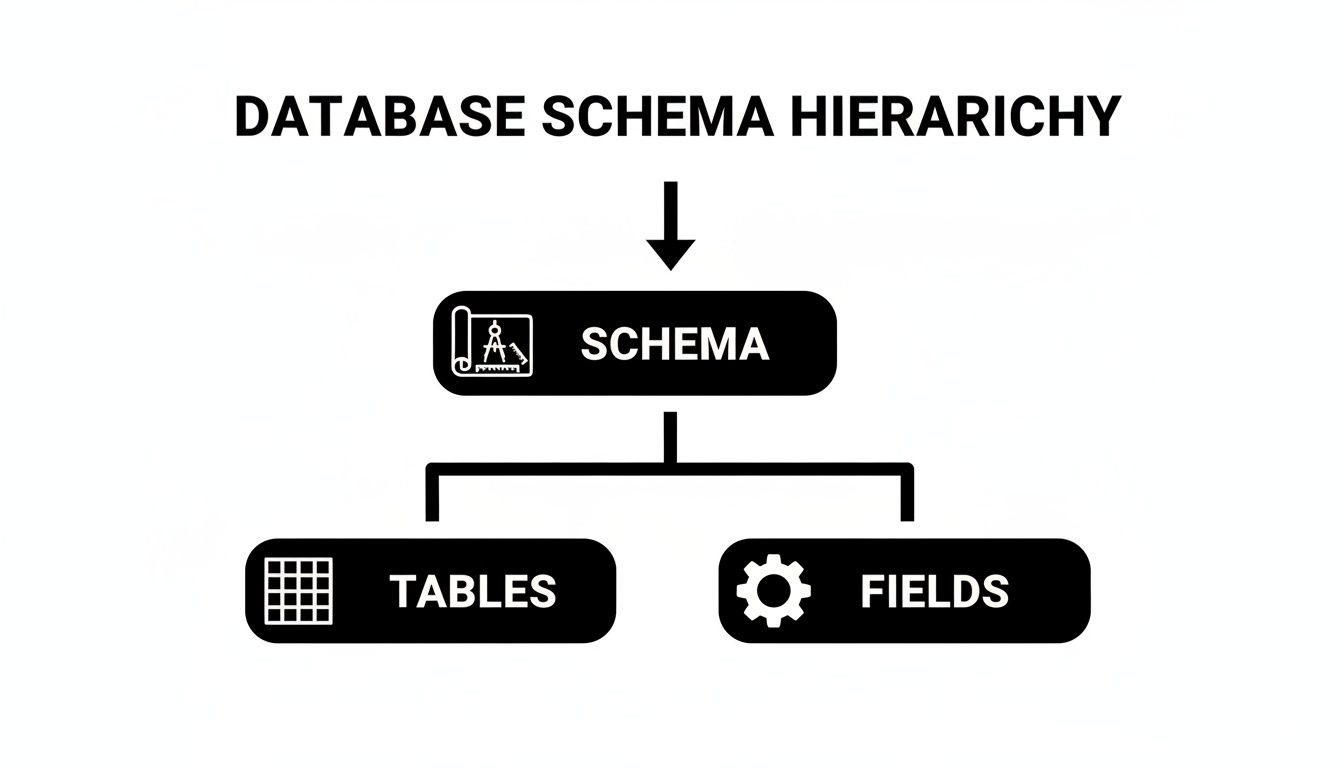
As you can see, the schema is the master plan that defines the tables, which in turn dictate the fields inside them.
The Logical Schema: The Business View
The logical schema is all about defining data from a business point of view. It’s completely "database-agnostic," meaning it’s not tied to PostgreSQL, MySQL, or any other specific technology. It just describes the entities, their attributes, and the relationships between them.
Its main job is to:
- Define Entities: Pinpoint the core objects your business cares about, like
UsersorProducts. - Establish Relationships: Map out how these entities connect. For example, a
Userplaces anOrder. - Specify Constraints: Enforce business rules, like making sure every
Orderis tied to a realUserID.
This abstract layer acts as a shared language, allowing different teams to talk about data in a way everyone understands.
The Physical Schema: The Technical Implementation
The physical schema is where the rubber meets the road. It details how the logical blueprint is actually built on a server using a specific database management system (DBMS). Its concerns are purely technical.
This is where you make decisions about storage engines, data types (like VARCHAR(255) vs. TEXT), and indexing strategies to make queries run faster. It’s the "how," not the "what."
Key Takeaway: The separation of logical and physical schemas is a cornerstone of modern database design. It lets you change or optimize the underlying storage technology without forcing you to rewrite the application code that relies on the data.
This separation of duties isn't a new idea. The concept was formally laid out in Edgar F. Codd's groundbreaking 1970 paper that introduced the relational model for databases. That work provided the foundation for using schemas to define tables and relationships in a structured way. This approach empowers teams to tune performance on the backend without ever disrupting the business logic in the application—a practice that’s just as critical today as it was decades ago.
Real-World Database Schema Examples
Theory is great, but let's get our hands dirty. Seeing how a database schema works in the wild is what really makes the concept click. We’ll look at two completely different applications—an e-commerce store and a social media feed—to see how the choice of schema directly impacts what an app can do and how it behaves.

Relational Schema for an E-commerce Store
Think about the last time you bought something online. Behind that simple "click to buy" button, a relational database is working tirelessly to track every single detail with precision. The schema for this kind of system is all about structure and integrity, making sure every transaction is airtight.
You’d likely find a set of interconnected tables that look something like this:
UsersTable: This is where customer info lives. Each row has a uniqueUserID(the primary key), along with aName,Email, and shipping address.ProductsTable: Every item for sale gets its own entry here, with aProductIDas its primary key, plus details likeProductNameandPrice.OrdersTable: This is the glue that holds it all together. It tracks each order with anOrderID,OrderDate, and—this is the important part—two foreign keys:UserIDandProductID.
Those foreign keys are the secret sauce. The UserID in an order must point to a real person in the Users table, and the ProductID must link to an actual item in the Products table. This rigid, interlocking structure makes it impossible to, say, create an order for a customer who doesn't exist or a product that’s out of stock. It's the perfect setup for systems where you absolutely cannot afford mistakes.
NoSQL Schema for a Social Media Feed
Now, let's flip the script and think about your social media feed. The data here is messy, unpredictable, and changes by the second. One post is just text, the next has three photos and a location tag, and another is a video with a poll attached. Trying to cram all that variety into a rigid relational schema would be a nightmare.
This is where a flexible NoSQL schema, often using a document model like JSON, really shines. Instead of spreading data across multiple tables, you might have a single collection of "post" documents.
A single post document could contain all its related data nested inside it. This might include the post content, a list of user IDs who liked it, and an array of comment objects, each with its own author and timestamp.
This "schema-on-read" approach gives developers incredible freedom. Want to add a new feature, like polls? You don't have to overhaul the whole database. New posts can simply start including a "poll" object within their document. This kind of flexibility is a massive advantage for applications that need to evolve fast and handle huge amounts of traffic.
The trade-off, of course, is that the responsibility for data consistency shifts from the database to the application code, since the schema itself doesn't enforce those strict rules.
Why Strong Schema Design Is a Business Imperative
Knowing what a database schema is helps with the technical side of things, but its real-world value is measured in business outcomes. A well-designed schema isn't just a box to tick for engineers; it's a strategic asset. Think of it as the bedrock for your data integrity, application speed, and even how well your teams work together. It’s your first and best line of defense for data quality.
By setting clear rules for data types, formats, and relationships, your schema acts as a gatekeeper. It stops bad data from ever making it into your system, ensuring the information that feeds your analytics and business decisions is trustworthy from day one.
Driving Performance and User Experience
How you structure your data has a direct, and often dramatic, impact on how fast your application can access it. When a schema is logical and well-organized, queries run fast and efficiently. The result? A snappy user interface, quick reports, and an overall better experience that keeps your users happy and engaged.
On the flip side, a poorly planned schema creates a mess of slow, complicated queries that drag your application to a halt. This kind of technical debt leads to a sluggish user experience and can make pulling timely insights feel nearly impossible, crippling your ability to adapt and grow.
Creating a Common Language for Teams
A good schema does more than just organize data; it organizes people. It serves as a clear blueprint that everyone—from developers to product managers to data analysts—can look to for answers. It becomes the single source of truth that eliminates confusion.
A schema ensures everyone is speaking the same data language. When a product manager requests a feature involving 'customer orders,' the development team knows exactly which tables, fields, and relationships that term refers to.
This shared understanding helps cut down on the costly misunderstandings and back-and-forth that can plague development cycles. In fact, research shows that schema design errors are responsible for an estimated 40% of production bugs in scaling applications. This is precisely why tools that simplify schema generation, like the AI features in FlyDash, are becoming so important for teams trying to build reliable systems. You can learn more about similar challenges in the Stack Overflow 2024 survey findings.
The table below breaks down the real-world impact of your schema design choices.
| Area of Impact | Good Schema Design (The Outcome) | Poor Schema Design (The Consequence) |
|---|---|---|
| Data Quality | High-integrity, reliable data you can trust. | Inconsistent, error-prone data that leads to bad decisions. |
| Performance | Fast queries, responsive applications, happy users. | Slow load times, sluggish performance, frustrated users. |
| Development | Faster development cycles, fewer bugs, and less confusion. | Constant rework, difficult-to-fix bugs, and team friction. |
| Scalability | Smooth growth and the ability to add new features easily. | Painful migrations, costly rewrites, and stalled progress. |
Ultimately, the choice to invest in good schema design is a choice to invest in the future health of your application and your business.
Enabling Scalability and Future Growth
Maybe the most important business benefit of all is scalability. A thoughtful schema is built with the future in mind. It anticipates new features and growing data volumes, so your business isn't painted into a corner by its initial data structure.
Putting off proper schema design is just asking for trouble down the road. Companies that outgrow a poorly planned schema are often staring down the barrel of a massive, expensive, and high-risk data migration project. A strong schema, on the other hand, is an investment that provides a stable yet flexible foundation for long-term success.
Modern Best Practices for Schema Design

Designing a great database schema isn't a one-and-done task. It's about building a solid, flexible foundation that can grow and adapt right alongside your application. Getting it right from the start means your schema will be scalable, easy to maintain, and a breeze for your team to understand down the road. It all boils down to one simple rule: consistency.
The very first step is establishing clear and consistent naming conventions. Pick a style—whether it's camelCase or snake_case—and stick with it for every table and column. This small act of discipline makes a world of difference. Using singular nouns for tables (like User instead of Users) and clear, descriptive column names (createdAt instead of c_date) removes ambiguity and helps developers get up to speed faster.
Embracing Normalization and Data Types
With your naming conventions locked in, the next crucial step is data normalization. At its core, normalization is just the practice of organizing your data to eliminate redundancy and keep everything consistent. Think about it this way: instead of storing a customer's full address in every single order they place, you store it just once in a User table. The Order table then simply points back to that user with a userId.
This approach saves you from a world of headaches. If a user moves, you only have to update their address in one spot, not hunt it down across hundreds of past orders. This principle is a cornerstone of what a schema is in database design for any relational system.
Choosing the right data types is just as vital for keeping things running smoothly.
- Be Specific: If you're storing whole numbers, use
INTEGER, not a catch-allVARCHAR. - Optimize for Size: Always pick the smallest data type that will get the job done. A
BOOLEANtype for true/false values is far more efficient than storing the text "true" or "false". This saves precious storage space and makes your queries fly.
Key Insight: A well-normalized schema with carefully chosen data types doesn't just protect your data's integrity—it also gives you a massive performance boost, resulting in a faster, more reliable application.
For tools like FlyDash, this whole process is supercharged. FlyDash users—often startup founders and developers—get AI-generated schemas that default to a relational structure for maximum speed. Normalization can lead to 80% faster queries compared to NoSQL, according to TPC benchmarks. Then, it can flex to a schema-on-read model for APIs, slashing development time by 90%. You can learn more about the history behind these database concepts and their performance implications.
Planning for Schema Evolution
Here’s a hard truth: requirements always change. A schema is never really "finished." The real challenge is managing schema evolution—the art of modifying your database structure without bringing your live application to a screeching halt. This is where schema migrations and version control become your best friends.
Instead of nervously running manual SQL commands on a production database (a recipe for disaster), modern teams use migration scripts. Each script is a small, controlled change—like adding a new column or creating an index—and it's checked into version control just like any other piece of code.
These automated scripts are part of the development lifecycle. They get reviewed, tested, and deployed through a proper CI/CD pipeline. This disciplined approach lets you evolve your schema safely and reliably, turning what used to be a high-stakes event into a routine, agile process.
Common Questions About Database Schemas
Even after you've got the basics down, a few questions always seem to pop up when teams start getting their hands dirty with database schemas. These little points of confusion can stall development or, worse, lead to design mistakes that are a pain to fix later. Let's tackle some of the most common ones.
Answering these questions head-on will give you a much stronger foundation for discussing schema design and making smart choices for your projects.
What Is the Difference Between a Database and a Schema?
This one trips up just about everyone, and it's not your fault—different database systems use the terms in slightly different ways. The clearest way I've found to explain it is with an analogy: if a database is an entire library, then a schema is that library's detailed cataloging system.
The library (the database) is the physical building and all the shelves holding the books (your data). But without the catalog (the schema), it's just a chaotic warehouse of information. The schema is what brings order, defining where each book belongs, its genre, and how it relates to everything else on the shelves.
To make things more confusing, systems like MySQL often use "database" and "schema" to mean the same thing. But in platforms like PostgreSQL, you can have a single database that contains multiple, completely separate schemas. This is incredibly useful for organization. Imagine creating distinct "MarketingData" and "SalesData" schemas within the same company database to keep everything tidy and secure.
Does NoSQL Mean There Is No Schema?
This is a huge and very common misconception. NoSQL doesn't mean "no schema" at all. A much better way to think about it is "schema-on-read," which stands in contrast to the "schema-on-write" model of traditional relational databases.
Here’s what that actually means:
-
Schema-on-Write (Relational): Before you can save any data, it absolutely must fit the predefined blueprint. If a piece of data doesn't match the rules for a column, the database will reject it flat out. This is all about enforcing maximum consistency from the start.
-
Schema-on-Read (NoSQL): You can toss flexible, semi-structured data into the database without a rigid upfront plan. The structure, or schema, is applied by your application as it reads the data out.
This approach gives you incredible flexibility, especially for applications that are evolving fast. The trade-off? The responsibility for maintaining data consistency shifts from the database to the developers writing the application code.
Key Takeaway: The schema doesn't vanish in the NoSQL world; its enforcement point just moves. This flexibility is a powerful tool, but it demands discipline in your code to prevent a "garbage in, garbage out" situation.
How Do You Choose the Right Schema for a Project?
There’s no magic bullet here. The right choice always boils down to your project's specific needs, the shape of your data, and what you're trying to achieve as a business. The goal isn't to find the "best" schema type, but the one that aligns with your application's demands for consistency, speed, and adaptability.
If you're dealing with highly structured, transactional data where consistency is king—think financial ledgers, inventory systems, or e-commerce orders—a relational schema is almost always the right call. Its rigidity is a feature, not a bug, because it guarantees data integrity.
On the other hand, if your world is full of unstructured or rapidly changing data that needs to scale out fast—like user-generated content, IoT sensor readings, or social media feeds—a NoSQL schema provides the agility you need. It lets you innovate without being handcuffed to a fixed structure.
Ready to move from theory to practice? With FlyDash, you can build internal tools and dashboards by simply describing what you need. Our AI generates a complete, working application with a well-structured schema in minutes, letting you connect to real databases and scale your operations faster. Stop wrestling with schema design and start building at https://flydash.io.
Ready to Build Your App?
Turn your idea into a production-ready React Native app in minutes.
Free tools to get you started
Free AI PRD Generator
Generate a professional product requirements document in seconds. Describe your product idea and get a complete, structured PRD instantly.
Try it freeFree AI App Name Generator
Generate unique, brandable app name ideas with AI. Get creative name suggestions with taglines, brand colors, and monogram previews.
Try it freeFree AI App Icon Generator
Generate beautiful, professional app icons with AI. Describe your app and get multiple icon variations in different styles, ready for App Store and Google Play.
Try it freeFrequently Asked Questions
RapidNative is an AI-powered mobile app builder. Describe the app you want in plain English and RapidNative generates real, production-ready React Native screens you can preview, edit, and publish to the App Store or Google Play.