Discover: what is code generation and how it accelerates apps
Learn what is code generation and how it automates coding, boosts consistency, and accelerates app delivery.
By Damini
18th Jan 2026
Last updated: 18th Jan 2026

So, what exactly is code generation? At its core, it's the process of using a program to write other programs. Think of it as a smart assistant that takes a high-level plan—like a diagram, a set of rules, or even a plain English description—and automatically churns out the source code needed to make it a reality.
This isn't about replacing developers. It’s about giving them a power tool. Instead of spending hours on repetitive, manual coding, they can focus on the big-picture design and the tricky parts of the logic.
From Manual Labor to Automated Blueprints
The best way to understand it is to think about getting a custom-tailored suit. You wouldn't weave the fabric and sew every single stitch by hand. Instead, you'd go to a master tailor, give them your measurements and style choices, and let them use their expertise—and their specialized tools—to craft the perfect garment. Code generation is the software equivalent of that tailor.
You provide the "measurements" (your specifications), and the generator handles the meticulous "stitching" (writing the code).

This approach frees up teams to build complex software faster and, just as importantly, with far fewer of the tiny human errors that inevitably creep in when you're doing the same boring task over and over.
The Core Components of Code Generation
No matter how fancy the tool, every code generation system boils down to three key parts working in harmony. Once you get these, the whole process clicks into place.
- The Input: This is your blueprint. It's the set of instructions you provide. It could be a visual model, a simple configuration file (like a YAML or JSON file), or even just a natural language prompt you type into a chat-like interface.
- The Generator: This is the engine doing the heavy lifting. The generator is the program that reads your input, understands what you’re asking for, and applies a set of predefined rules or templates to write the code.
- The Output: This is the finished product—clean, ready-to-use source code in a language like Python, JavaScript, or C#. You can then take this code, compile it, run it, or plug it straight into an existing project.
This simple but powerful concept is the engine behind modern software efficiency. By automating the creation of boilerplate and repetitive code, teams free up valuable time to concentrate on solving unique business problems and delivering features that truly matter. This shift not only accelerates development cycles but also improves overall code quality and maintainability.
The Journey of Code Generation: From Compilers to AI
To really get a handle on code generation, you have to look at where it came from. The idea didn't just pop up with fancy AI. It started back in the 1950s with tools that solved a massive headache for the first software pioneers.
Before these tools existed, programming was a brutal, hands-on affair. Picture developers in the 1940s, physically punching cards to feed a computer its instructions, one tedious line at a time. It was painfully slow and mistakes were everywhere. The big breakthrough came in 1952 when Grace Hopper created the A-0, the very first compiler. This was code generation in its purest form: a program that translated human-readable symbols into the raw machine code a computer could execute.
That single invention changed everything. By 1957, IBM's FORTRAN compiler was already proving to be 20-50% more efficient than hand-written assembly code. Even better, it slashed coding errors by up to 90%. Teams could suddenly build complex software roughly 5x faster. If you explore more about the evolution of software development, you can see how deeply these early wins shaped the way we work today. The core mission—automating the boring stuff to save time and prevent errors—is still what drives code generation.
From Simple Scripts to Sophisticated Frameworks
As programming languages got more powerful, our automation needs grew right alongside them. Those early compilers were just the beginning, paving the way for all sorts of new generators.
Things really picked up in the 1990s and 2000s with the boom in object-oriented programming and web development. Developers got tired of writing the same repetitive code over and over, so they built small scripts and tools to handle it for them. Think about generating boilerplate for a new class or creating a data access layer directly from a database schema.
Soon, these ad-hoc solutions evolved into much more integrated tools:
- Scaffolding: Frameworks like Ruby on Rails became famous for tools that could generate an entire feature's file structure—models, views, and controllers—from a single command.
- IDEs: Integrated Development Environments started including built-in code generation, like automatically creating getter and setter methods or implementing interfaces with a right-click.
This was a huge shift in thinking. Generators were no longer just translating code; they were building the foundational skeleton of our applications. This freed developers from the tedious setup and let them jump straight into solving real business problems.
The Rise of AI and Natural Language
This 70-year journey of automation has brought us to its most powerful iteration yet: AI. Where older tools needed structured input—a database schema, a specific command—today's AI-driven generators can understand plain English.
That means the source of truth is no longer just a technical artifact. A project manager can write a paragraph describing a new feature, and an AI tool can translate that description into functional code. This leap from machine-level translation to conversational instruction isn't some fleeting trend. It’s the next logical step in our long quest to build better software, faster.
Understanding The Different Code Generation Methods
Code generation comes in many flavors rather than a single, one-size-fits-all solution. Think of it as a workshop filled with specialized tools—you choose the right one depending on whether you’re spinning up a small script or scaffolding an entire application.
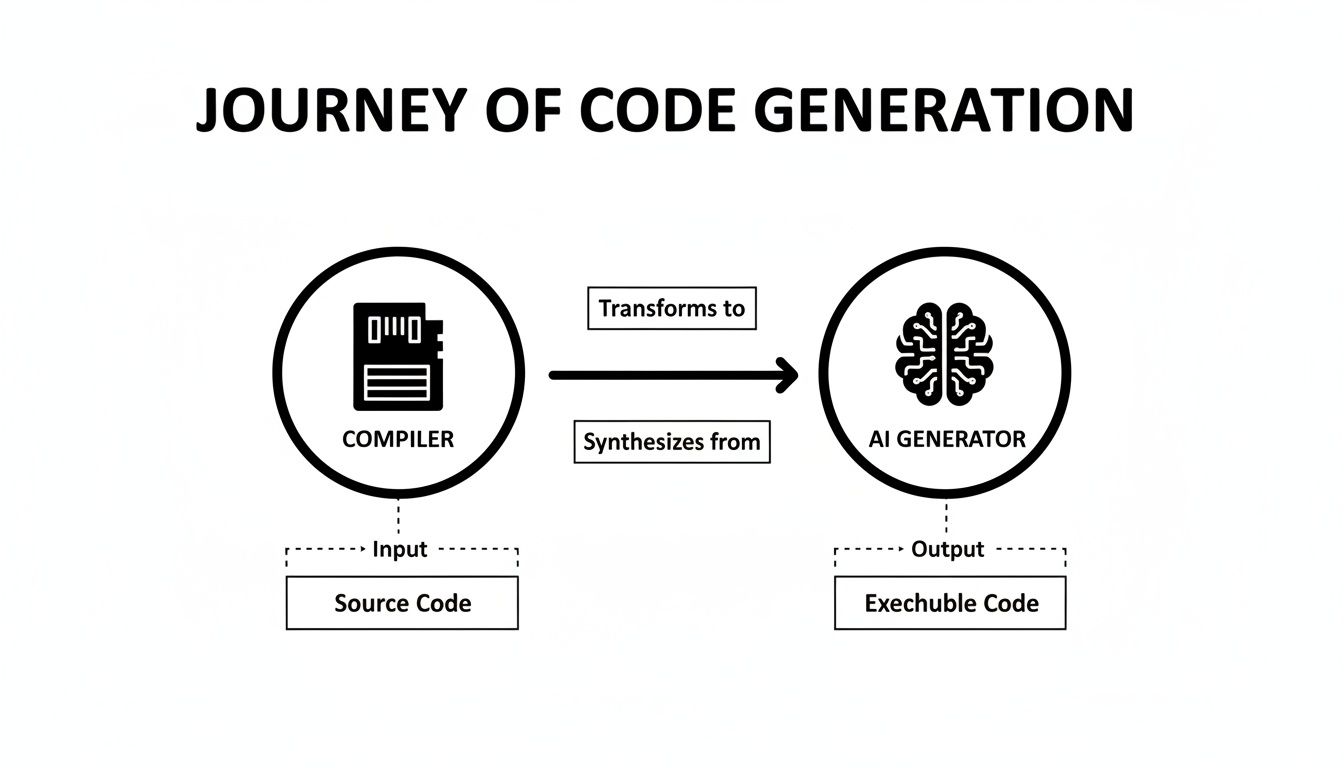
Each stage of this journey raises the level of abstraction. You move from hand-writing every line to simply describing the outcome you want.
Template-Based Generation
Template-based generation works like a mail merge in your email client. You draft a master file with placeholders, then feed it data. The generator replaces those blanks and spits out many similar code files automatically.
This method shines when you need:
- Repetitive code patterns
- Consistent project scaffolding
- Quick setup for multiple API endpoints or UI components
It’s straightforward to configure and delivers predictable, uniform results.
Model-Driven Generation
With model-driven generation, your starting point is a visual diagram or config file—your project’s blueprint. The generator reads this high-level model and constructs everything from database schemas to service layers.
You get:
- A single source of truth for design changes
- Automatic propagation of updates across the codebase
- Rapid creation of complex enterprise structures
This approach cuts down on drift between architecture and implementation.
Compiler-Based Generation
Compiler-based generation taps into your existing code by building an Abstract Syntax Tree (AST). Imagine an editor that not only checks your grammar but can also rework sentences on the fly.
Key capabilities include:
- Fine-grained refactoring across an entire project
- Adding or modifying nodes in the AST before output
- Implementing decorators and compile-time enhancements
This powers powerful IDE features and language extensions.
AI-Driven Generation
The latest entrant is AI-driven generation, where you type a description and let a Large Language Model (LLM) handle the rest. It feels like dictating code to an expert who instantaneously writes functions or full applications.
Use cases span:
- Debugging snippets on demand
- Producing custom internal tools via FlyDash
- Generating end-to-end prototypes from plain-English requests
This method lowers the barrier for non-developers and accelerates early-stage development.
Here’s a side-by-side look at the four main approaches to code generation:
Comparing Code Generation Approaches
| Approach | Core Concept Analogy | Best For | Flexibility |
|---|---|---|---|
| Template-Based | Mail Merge | Boilerplate code and similar components | Low |
| Model-Driven | Architect’s Blueprint | Enterprise systems and schema generation | Medium |
| Compiler-Based | Intelligent Proofreader | Refactoring tools and language plugins | High |
| AI-Driven | Expert Assistant | Rapid prototyping and non-dev workflows | Very High |
Each of these methods has its sweet spot. By matching your project’s needs to the right technique, you’ll streamline development and keep your code aligned with your vision.
How Code Generation Solves Real Business Problems
So, we've covered the "what," but what about the "why"? How does code generation actually make a difference for businesses day-to-day? In a nutshell, it’s all about closing the gap between an idea and a working piece of software, giving companies a serious leg up on the competition.
Think about an operations manager who desperately needs a custom app to track warehouse inventory. The old way? That’s a six-week (or more) development cycle, tying up multiple teams and a hefty budget. The new way? They describe what they need, and a code generation tool can spit out a functional application in just a few hours.
This means the manager gets a solution to their problem now, not next quarter. They're no longer stuck in a long IT queue, waiting for their turn.
Accelerating Innovation for Everyone
This isn't just for big-company problems. Startups trying to find their footing can use this same speed to their advantage. A founder can generate a working prototype for a new customer feedback dashboard without writing a single line of code.
This lets them get the tool in front of real users for immediate feedback, helping them figure out what works—and what doesn't—months earlier than they could have otherwise.
Modern tools like Flydash even make this a collaborative process, where teams can build apps visually together.

This kind of real-time, shared environment feels more like working in a design tool than a complex IDE, breaking down barriers between team members.
Even for seasoned developers, the payoff is huge. Instead of grinding through days of boilerplate code—setting up APIs, connecting to databases, or building out standard UI components—they can generate it all in an instant. This frees them up to pour their expertise into the complex, unique business logic where they truly create value.
By automating the repetitive, foundational tasks, code generation lets businesses build without the usual constraints. It’s not just about moving faster; it's about shifting your most valuable resource—your team's brainpower—toward innovation and solving bigger problems.
The Real-World Impact on Productivity
This shift isn't just theoretical; it shows up in the numbers. Teams that embrace code generation see major improvements that directly solve common business headaches.
- Faster Time-to-Market: Getting products and internal tools out the door in a fraction of the time means you can react to market changes and customer needs that much quicker.
- Reduced Development Costs: When you automate huge chunks of coding, you reduce the hours needed from your engineering team, which makes projects far more budget-friendly.
- Empowered Non-Technical Teams: Suddenly, experts in finance, marketing, or ops can build the exact tools they need without having to depend on an overloaded IT department.
- Increased Focus on High-Value Work: Developers get to escape the drudgery of repetitive tasks and focus on the tough, creative challenges that only a human can solve.
When you look at these outcomes, it becomes clear that code generation isn't just a technical curiosity. It's a fundamental tool for unlocking new levels of efficiency and innovation across the entire organization.
The AI Revolution in Code Generation
The arrival of Artificial Intelligence, and Large Language Models (LLMs) in particular, represents the single biggest leap forward in the history of code generation. This isn't just another incremental update. We're talking about a fundamental shift in how software gets made, moving from rigid, structured instructions to simple, conversational requests.
Think about the older methods—they all depended on strict templates or painstakingly detailed models. Modern AI tools are different. They understand natural language, which throws the doors wide open for who can create software. Suddenly, an operations manager or a startup founder can just describe a business problem and get functional code back.
This change is making development accessible to everyone. A finance lead who needs a custom reporting dashboard no longer has to get in line and wait weeks for the engineering team. They can outline the charts, data sources, and UI they need, and an AI generator can build it. An idea becomes a working tool in minutes, not months.
A Powerful Partner for Developers
For professional developers, AI has become an indispensable assistant, automating the grunt work and massively boosting their output. Instead of manually writing boilerplate code or hunting down common bugs, they can hand those tasks off to an AI partner. This frees them up to focus on what really matters: complex architecture and innovative business logic.
This new way of working has caught on incredibly fast. The use of AI-driven code generation exploded after 2020. By 2023, a staggering 92% of developers in the US were already using AI tools in their workflow. In large companies, AI now generates anywhere from 30-50% of all new code. This isn't some niche trend; it's a core part of the modern development process that's completely changing the game for speed and delivery. You can read more about the rise of AI code generators at InfoWorld.
The takeaway is clear: AI isn't just about writing code faster. It’s about changing who can build software and how quickly an idea can become a reality.
From a Single Prompt to Production-Ready Code
The most profound change AI brings to the table is the ability to generate entire applications from a single, high-level prompt. Tools like FlyDash are a perfect example of this new reality, letting users build and deploy full-stack internal tools—complete with a frontend, backend, and database—in just a few minutes.
This approach flips the traditional development model on its head, offering some huge advantages:
- Blazing-Fast Speed: You can prototype, test, and deploy ideas in a tiny fraction of the usual time.
- No Vendor Lock-In: The best AI tools let you export standard, Git-ready code, so you always have full ownership and control.
- Smarter Debugging: LLMs can analyze code snippets and suggest fixes, helping developers solve problems up to 60% faster.
This is so much more than a productivity boost. It's a complete reimagining of the development lifecycle. The wall between a strategic business need and a working software solution has all but disappeared.
How to Implement Code Generation in Your Workflow
Alright, so the idea of code generation sounds great, but how do you actually make it a part of your team's day-to-day work? It's not about flipping a switch overnight. It starts with taking a hard look at your current development process and finding the perfect spots for automation.
Think about the repetitive, boilerplate tasks that eat up your team's time but don't require a ton of creative problem-solving. Those are your prime candidates.
What does that look like in practice?
- Building UI components: How many times have you built the same form, table, or button, just with slightly different data? If it follows your design system, it can be automated.
- Database boilerplate: Spinning up new database schemas and then writing all the data access layers (CRUD operations, anyone?) is a classic time-sink ripe for generation.
- API clients: If you have a clear API spec, like OpenAPI, you can automatically generate the client code needed to interact with it, saving hours of manual work.
Once you have a specific, high-impact task in mind, you can start looking for the right tool for the job.
Choosing the Right Tools and Process
Finding the right code generation tool isn't just about features; it's about fit. You need to weigh a few key things. First, how easy is it to use? This is especially critical if you want non-developers, like designers or product managers, to build internal tools. A steep learning curve can kill adoption before it even starts.
Next, you need to think about integration. Does it play nicely with the tools you already rely on? Seamless integration with your version control system, like Git, is non-negotiable.
But perhaps the most important factor is ownership. Look for tools that let you export and own your code. This is your escape hatch from vendor lock-in. Having the freedom to take the generated code, modify it however you want, and deploy it anywhere gives you total control over your application's destiny.
My best advice? Start small. Don't try to automate your entire application in one go. Pick a single, well-defined pilot project. Prove the value, build some momentum, and get your team excited about the possibilities.
Best Practices for Team Adoption
Getting the team on board is just as important as picking the tool. To make the transition smooth, you need to set some ground rules right from the start. Create clear standards for how generated code is handled. How is it reviewed? What are the testing requirements? How does it get merged into the main codebase? Answering these questions early prevents chaos later.
Finally, don't just hand your team a new tool and walk away. Give them proper training and clear, accessible documentation. When people feel confident and empowered, they'll be far more likely to embrace the change. By starting small, setting clear standards, and investing in your team's knowledge, you can weave code generation into your workflow and start seeing those productivity gains for real.
Got Questions About Code Generation? We've Got Answers.
It's natural to have questions when you're thinking about changing how you build software. Let's tackle some of the most common ones that come up when teams first look into code generation.
Is AI-Generated Code Actually Any Good?
This is the big one, isn't it? While AI can write code incredibly fast, it's not a magic bullet for quality. In fact, some studies have shown AI-written code can have 1.7 times more issues than code written by a human, especially when it comes to tricky logic, readability, or handling edge cases.
Think of it this way: AI is an incredibly powerful assistant, not a replacement for an experienced developer. Human oversight and a solid code review process are still absolutely essential to catch those subtle bugs and ensure everything is up to snuff.
Am I Going to Get Trapped by a Single Vendor?
That's a completely fair question. Nobody wants to be stuck in a "walled garden." The good news is that modern code generation tools are built with this exact concern in mind.
For example, platforms like FlyDash are designed for flexibility. You can export clean, standard, Git-ready code whenever you want. This means you own your application completely. You're free to take it, modify it, host it anywhere, and maintain it on your own terms. No lock-in, period.
Is This Stuff Just for Coders?
It used to be, but not anymore. Traditionally, you needed to be a developer to get any real use out of code generation. The game has changed with AI and natural language interfaces.
Now, product managers, operations leads, even founders can build the internal tools they've been dreaming of just by describing what they need. It’s opened up software development to a much wider audience, letting the people who know the problem best build the solution themselves.
Ready to see this in action? With FlyDash, you can build full-stack internal apps in minutes, not months, just by describing what you need. Collaborate with your team in real-time and export clean code anytime—no strings attached. Start building for free at FlyDash.io and watch your ideas come to life.
Ready to Build Your App?
Turn your idea into a production-ready React Native app in minutes.
Free tools to get you started
Free AI PRD Generator
Generate a professional product requirements document in seconds. Describe your product idea and get a complete, structured PRD instantly.
Try it freeFree AI App Name Generator
Generate unique, brandable app name ideas with AI. Get creative name suggestions with taglines, brand colors, and monogram previews.
Try it freeFree AI App Icon Generator
Generate beautiful, professional app icons with AI. Describe your app and get multiple icon variations in different styles, ready for App Store and Google Play.
Try it freeFrequently Asked Questions
RapidNative is an AI-powered mobile app builder. Describe the app you want in plain English and RapidNative generates real, production-ready React Native screens you can preview, edit, and publish to the App Store or Google Play.