Discover what is no code development and unlock rapid apps
Explore what is no code development and how it enables fast, scalable apps without coding. A practical guide to get you building today.
By Riya
23rd Jan 2026
Last updated: 23rd Jan 2026
Ever wondered if you could build a software application without being a programmer? That’s exactly what no-code development is all about: a way to create fully functional apps, websites, and tools without writing a single line of code.
The Coding Revolution That Requires No Code

Think of it like building with LEGOs. Instead of needing to know the complex chemistry of plastic molding, you just snap pre-made, functional bricks together to create something new. No-code platforms work the same way, offering a visual, drag-and-drop canvas where you assemble pre-built components to bring your ideas to life.
This approach fundamentally changes who can create software. It takes the power out of the hands of a few specialized developers and gives it to the business experts who live and breathe the problems they're trying to solve. An operations manager, a finance lead, or a product manager can now build the exact tool they need, right when they need it, without getting stuck in a long IT queue.
Demystifying Technology For Business Users
The real magic of no-code is how it translates your business logic directly into a working application. The platform handles all the heavy lifting—the complex backend code, databases, and server configurations—completely behind the scenes. You just focus on what you want the app to do.
This shift is creating a massive wave in the tech world. The combined no-code and low-code market hit $28.75 billion in 2024 and is expected to balloon to an incredible $264.40 billion by 2032. This explosive growth shows just how many businesses are turning to these tools to get work done faster. You can explore more about these market growth statistics to see how it's reshaping the industry.
Essentially, a no-code platform acts as an expert translator, converting your visual instructions into the sophisticated, high-quality code required to run the application.
The goal isn't to replace developers but to empower the other 99% of employees. It enables them to solve their own specific problems, freeing up engineering teams to focus on complex, mission-critical challenges that truly require their expertise.
This method is all about democratizing software creation. It helps build a culture where anyone can be a builder, problems get solved faster, and innovation can come from every corner of the business. Ultimately, it makes technology accessible to everyone.
To get started, it helps to understand the core building blocks that make no-code possible. This summary table quickly breaks down the fundamental principles, offering a quick overview before you dive deeper into the details.
Core No Code Concepts at a Glance
| Concept | What It Means in Practice | Analogy |
|---|---|---|
| Visual Development | You build your application's interface by dragging and dropping elements like buttons, forms, and charts onto a canvas. | It's like arranging furniture in a room using a design app instead of building each piece from scratch. |
| Declarative UI | You define what you want the app to look like and do, not how to do it. The platform figures out the rest. | Ordering a pizza: you specify the toppings and size, but you don't instruct the chef on how to knead the dough. |
| Data Abstraction | You connect to data sources (like Google Sheets, SQL databases) through simple connectors, without needing to write queries. | It's like using a universal remote that works with your TV, soundbar, and streaming device without needing to know their internal wiring. |
| Pre-built Logic | Workflows and business rules are created by connecting logical blocks, like "when this button is clicked, then send an email." | It’s like setting up a chain reaction with dominoes. You set the path, and one action automatically triggers the next. |
With these concepts in mind, you can see how no-code isn't just a trend; it's a practical and powerful way to build software. It allows the people with the business knowledge to become the creators themselves.
How No-Code Platforms Actually Work

So, what’s really going on behind the curtain of a no-code platform? It’s not magic, but it’s pretty clever.
Think of it like being a chef in a high-end kitchen that comes fully stocked. You don't have to grow the vegetables, butcher the meat, or spend eight hours simmering a stock. All the high-quality ingredients are already prepped for you: the carrots are diced, the sauces are reduced, and the proteins are cooked to perfection. Your job is to take these ready-made components and assemble them into a fantastic meal.
That’s exactly what no-code platforms do for software. They give you a library of professionally coded, pre-built "ingredients"—things like user authentication forms, data tables, interactive charts, and payment buttons. You aren't writing code; you're just arranging and connecting these reliable building blocks to create your own unique application.
The platform handles all the messy, complicated stuff in the background. It manages the servers, the databases, the security, and all the underlying code so you can focus entirely on what your tool needs to do, not the nitty-gritty of how it gets built.
The Three Core Components
When you peel back the layers, almost every no-code platform operates on three fundamental pillars. Get a handle on these, and you'll understand how a few clicks and drags can produce a genuinely powerful application.
-
Visual UI Builder: This is your digital canvas. It's the drag-and-drop interface where you design the front-end—what your users will actually see and interact with. You grab elements like buttons, input fields, and images and arrange them on the screen, much like you would design a slide in a presentation deck.
-
Workflow Engine: This is the brain of your application. It’s where you define the logic using simple "when this happens, do that" rules. For instance, you could set up a workflow that says, "When a user clicks the 'Submit' button, then save the form data to a Google Sheet and send a confirmation email."
-
Data Management System: This is your application’s memory. It’s a user-friendly way to manage all the information your tool needs. Here, you can build a simple database from scratch or, more commonly, connect to existing data sources like an internal SQL database, a CRM like Salesforce, or a warehouse like BigQuery.
Together, this trio is what translates your visual ideas and business rules into a real, working piece of software.
The platform essentially acts as an expert engineering team working for you 24/7. It takes your visual instructions and automatically writes, hosts, and maintains the clean, scalable code required to run your application.
By providing these foundational building blocks, no-code democratizes software development. You don't need to be a programmer to build a tool anymore. You just need to deeply understand the problem you're trying to solve and the logical steps it takes to get there. The platform handles the rest.
No Code vs. Low Code vs. Traditional Development
Figuring out the best way to build a piece of software is a huge decision, and it’s easy to get lost in the jargon. To cut through the noise, let’s think about it like building a house. Each approach—no-code, low-code, and traditional development—gets the job done, but they serve very different needs, timelines, and budgets.
Traditional development is the equivalent of hiring a world-class architect and a construction crew to build a custom luxury home from the ground up. You’re in control of every single detail, from the blueprints and foundation to the specific angle of the roofline. This gives you total freedom, but it's also the most expensive and time-consuming route, demanding a team of highly skilled specialists.
Low-code development, on the other hand, is like using a high-end prefabricated home kit. The foundational structure—walls, roof, framework—is already built, which massively speeds things up. You still need skilled builders to assemble the pieces and handle the custom interior work like plumbing, wiring, and design, but you get to the finish line much faster and more cost-effectively than a full custom build.
So, what is no code development in this scenario? Think of it as furnishing a room with a modular system like IKEA. You don't need to be a carpenter or an architect. You just pick out the pre-made pieces you want, arrange them to your liking, and snap everything into place. It’s incredibly fast, anyone can do it, and it’s perfect for creating a functional space without hiring a pro.
Why Does This Matter Now?
This isn't just an academic distinction; it's a major shift in how businesses operate. Companies are under immense pressure to move faster, and traditional development timelines often can't keep up. The numbers tell the story: Gartner predicts that by 2026, a staggering 75% of all new applications will be built using low-code or no-code technologies. This isn't a fad. It's a direct response to the shortage of developers and the relentless demand for digital solutions now. You can learn more about Gartner’s forecast on the low-code market and see just how big this trend has become.
To make the right call for your own project, it helps to see exactly how these methods compare side-by-side.
The real question isn't about which method is "best," but which one is the right fit for your specific goal. A quick internal dashboard for the finance team has completely different needs than a complex, public-facing enterprise platform.
The table below breaks down the key differences across the factors that matter most when you're planning a project.
Comparing Software Development Approaches
To truly understand which path is right for you, let's lay out the core differences. This table compares the three approaches across key attributes like required skills, speed, flexibility, and typical use cases.
| Attribute | No-Code Development | Low-Code Development | Traditional Development |
|---|---|---|---|
| Required Skills | Anyone, really. Business users and "citizen developers" with zero coding knowledge. | A hybrid. Developers and tech-savvy business users who can write some code for customizations. | Highly specialized software engineers and developers with deep coding expertise. |
| Development Speed | Fastest. We're talking hours or days to build and launch a functional application. | Fast. Usually weeks. It’s a huge improvement over traditional timelines. | Slowest. Easily months or even years, with long, complex development cycles. |
| Flexibility | Limited. You work within the guardrails of the platform’s pre-built components. | Moderate. You can extend functionality with custom code, breaking out of the standard features when needed. | Unlimited. You have complete control to build any feature or integration you can dream up. |
| Ideal Use Cases | Internal tools, data dashboards, simple websites, and automating specific team workflows. | Business process automation, internal customer portals, and MVPs that need custom integrations. | Complex enterprise systems, high-performance consumer apps, and one-of-a-kind software products. |
Choosing the right approach comes down to balancing your need for speed, budget, and customization. For many internal business needs, the scale is clearly tipping away from long, code-heavy projects toward solutions that deliver value almost immediately.
The Business Case for No-Code: Faster, Cheaper, and Smarter
Knowing what no-code is all about is a great start, but the real magic happens when you see what it can do for your business. The core benefits—speed, cost-effectiveness, and team empowerment—aren't just talking points. They signal a genuine shift in how companies can build, adapt, and solve problems.
Move at the Speed of an Idea
The most obvious win with no-code is the sheer velocity. It's a game-changer. An operations team could wait six months for an over-burdened IT department to build a custom inventory tracker. Or, with no-code, they could have a working version live by the end of the day.
This isn't just about making things a little faster; it’s about creating a real competitive edge. The numbers are hard to ignore. Some companies have seen a staggering 90% reduction in development time. Financially, this translates to an average annual saving of $187,000 for businesses that adopt no-code.
When you can build and deploy tools that deliver a 362% ROI while slashing timelines by 90%, you’re fundamentally changing how your business operates. You can dive deeper into these no-code usage trends to see just how big the impact is.
Slash Development Costs
Beyond moving quickly, no-code makes a direct, positive impact on the budget. It dramatically reduces the need to hire expensive, specialized developers for every single internal tool or dashboard request.
This lets you reassign your most valuable technical resources—your engineering team—to the complex, high-stakes work on your core product. They get to solve the big problems instead of getting bogged down building another simple admin panel. You also cut down on the overhead tied to traditional development, from infrastructure management to long-term maintenance.
The hierarchy below shows exactly where no-code sits. It’s the most accessible layer, designed for business users, not just coders.
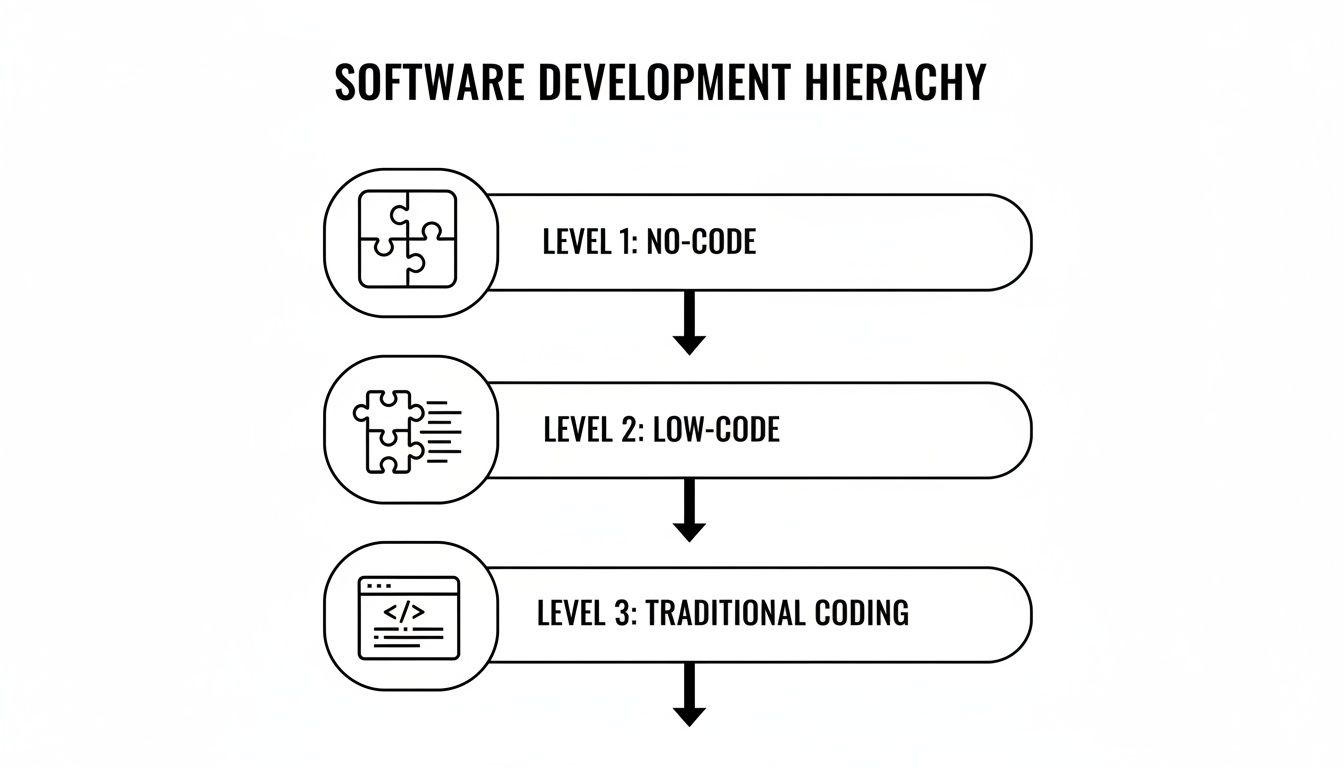
As you can see, it sits at the very top, abstracting away all the complexity of the code underneath.
Turn Your Experts into Builders
Maybe the most powerful benefit of all is how no-code empowers your non-technical teams. Think about a finance analyst who spends half their week fighting with messy, error-prone spreadsheets to build a forecast. Using a no-code platform like FlyDash, that same analyst can create a secure, automated dashboard that pulls in live data, completely on their own.
It's the same for a product manager. Instead of writing a lengthy spec and waiting weeks, they can build a functional minimum viable product (MVP) themselves and get real-time feedback from stakeholders in a single meeting. This closes the gap between idea and reality, making innovation a truly collaborative process.
No-code transforms your team's subject matter experts into problem-solvers. The person who feels the pain of an inefficient process is now the one equipped to build the solution, leading to better outcomes and faster innovation.
Practical No-Code Use Cases for Every Team

The real magic of no-code development isn't the tech itself—it's what happens when you put tool-building power directly into the hands of the people who actually do the work. When the experts on a process can build their own solutions, you see efficiency jump almost overnight. Instead of a great idea getting buried in a six-month IT backlog, teams can ship their own tools in a matter of days.
This is where the rubber meets the road. A no-code platform acts as a force multiplier, giving every department a way to tackle its own unique bottlenecks head-on. Let's dig into what this actually looks like for different teams.
Solutions for Operations Managers
Operations is the engine room of any company, juggling countless processes to keep the lights on. The problem? So many of those workflows are trapped in messy spreadsheets and endless email chains, which is a recipe for friction and human error.
No-code is a game-changer for Ops Managers, letting them build solid internal tools without needing a developer.
- Vendor Onboarding Portals: Ditch the back-and-forth emails. An Ops Manager can create a simple, secure portal for new vendors to upload their documents, check on their approval status, and find key resources. Everything is centralized, and notifications are automated.
- Equipment Checkout Systems: Need to track who has which laptop, projector, or company car? Build a quick app where employees can see what’s free, book an item, and get automatic return reminders. No more lost equipment or double-bookings.
- Inventory Management Dashboards: Hook up a dashboard to a database or even a simple Google Sheet. You get a live view of inventory levels, can track every item's movement, and trigger automatic low-stock alerts to the right person.
These aren't just minor tweaks; they replace total chaos with clean, automated systems.
Tools for Finance Teams
Finance runs on precision, security, and clear audit trails. All three are things you can build directly into a custom no-code app. This gets critical financial processes out of vulnerable spreadsheets and into a controlled, auditable environment.
By building their own tools, finance pros can make sure a process ticks every compliance and reporting box perfectly—instead of trying to shoehorn their work into a rigid, off-the-shelf system that doesn't quite fit.
A Finance Lead could whip up a custom app for things like:
- Budget Tracking and Requests: A central dashboard where department heads see their budget in real-time and submit new spending requests through a standardized form.
- Expense Approval Workflows: A multi-step approval flow that automatically sends an expense report to the right manager based on the amount or department. The best part? It logs a complete history of every approval and comment.
Accelerating Product and Development Teams
It might sound counterintuitive, but even your most technical teams get a huge boost from no-code. Product Managers can stop writing lengthy, static spec docs and start building interactive prototypes. This lets them get real, hands-on feedback from users and stakeholders almost immediately, slashing the time it takes to validate an idea.
And for developers? No-code is a strategic ally. They can finally stop getting pulled off core product work to build yet another admin panel or a simple data-entry form. By empowering business teams to build these themselves, you free up invaluable engineering time to focus on the complex, mission-critical code that actually grows the business.
Some platforms, like FlyDash, even offer a brilliant "escape hatch." You can start fast with no-code and, if you ever need to, export the underlying code. It's the perfect blend of speed up front and control down the road.
How to Choose the Right No-Code Platform
The no-code market is exploding, and trying to pick the right platform can feel like drinking from a firehose. A tool can look slick in a polished sales demo, but will it actually solve your team's real-world problems? To cut through the noise, you need a solid framework for evaluating what truly matters.
First things first: usability. How intuitive is the interface for the people who will actually be using it every day? A great no-code tool should feel like an extension of their existing skills, not like they have to go back to school to learn a complex new piece of software. If the learning curve is a cliff, you've already lost the main benefit—speed.
Key Evaluation Criteria
Once you’ve got a feel for the user experience, it’s time to look under the hood at the technical guts of the platform. Your internal tools aren't built on an island; they need to talk to everything else in your tech stack.
-
Integration Power: How well does it play with others? You need to know if it can connect directly to your core systems. Look for native connectors to your databases (like PostgreSQL), CRMs, and analytics tools. Just as important is the flexibility to tap into any REST or GraphQL API you might need.
-
Scalability: That dashboard you built for ten people might work great now, but what happens when the whole company needs access? You have to ask if the platform can handle a surge in users and data without slowing to a crawl. Make sure its architecture is built to perform, otherwise you’re just creating a future bottleneck.
One of the biggest—and most legitimate—fears people have is vendor lock-in. It's a real concern. What if you build a mission-critical application and then outgrow the platform’s capabilities? Are you just stuck?
The best modern no-code platforms have an answer for this: an "escape hatch." This is a non-negotiable feature. It means you can export your entire application as clean, standard source code. You get the files, and you're free to host it anywhere or pass it to developers for custom work.
This is why a platform like FlyDash is so compelling. You get the incredible speed of no-code development today, but with the peace of mind that you own and control your work forever. It turns your no-code platform from a potential liability into a strategic asset that can grow with you.
Common Questions About No-Code
Got questions? You're not the only one. Here are some of the most common things people ask when they're first digging into no-code development.
Is No-Code Secure Enough For Business Applications?
This is probably the most important question, and the answer is a resounding yes—as long as you choose the right platform. Think about it: established no-code platforms have entire teams dedicated to security. They handle the complex stuff like infrastructure management, data encryption, user authentication, and staying compliant with regulations like SOC 2 and GDPR.
When you're vetting a tool, make its security page your first stop. And if you're dealing with exceptionally sensitive data, look for platforms that give you the option to deploy on a private cloud or even on-premise. That gives you the ultimate level of control.
Can No-Code Applications Actually Scale?
They absolutely can, but not all platforms are created equal here. Some simpler tools are perfect for small projects or teams, but they’ll hit a wall pretty quickly. On the other hand, enterprise-grade platforms are built from the ground up to handle thousands of users and huge volumes of data.
The secret is in the architecture. A platform that generates a real, industry-standard backend and connects to powerful databases like PostgreSQL is built for growth. It’s a world away from a tool that just uses a spreadsheet as its database.
What Happens If We Outgrow a No-Code Platform?
This is a smart question to ask upfront, and it highlights a massive difference between older tools and modern ones. The fear of "vendor lock-in" is real. What if you build a critical app and then hit a limitation you can't work around?
The best platforms have a built-in "escape hatch." They give you the ability to export your application's source code.
This feature is a game-changer. It means you can get the incredible speed of no-code to start, but if your needs become hyper-specific down the road, you can grab the code and hand it off to your dev team. You get the best of both worlds without ever losing control of your work.
Ready to see how fast your team can build the tools they need? With FlyDash, you can describe an app in plain English and our AI will generate a complete, production-ready tool in minutes. Build your first internal tool for free.
Ready to Build Your App?
Turn your idea into a production-ready React Native app in minutes.
Free tools to get you started
Free AI PRD Generator
Generate a professional product requirements document in seconds. Describe your product idea and get a complete, structured PRD instantly.
Try it freeFree AI App Name Generator
Generate unique, brandable app name ideas with AI. Get creative name suggestions with taglines, brand colors, and monogram previews.
Try it freeFree AI App Icon Generator
Generate beautiful, professional app icons with AI. Describe your app and get multiple icon variations in different styles, ready for App Store and Google Play.
Try it freeFrequently Asked Questions
RapidNative is an AI-powered mobile app builder. Describe the app you want in plain English and RapidNative generates real, production-ready React Native screens you can preview, edit, and publish to the App Store or Google Play.